
微服务网关Zuul+Spring security+Oauth2.0+Jwt + 动态盐值 实现权限控制,开放接口平台(5)
积累知识,胜过积蓄金银!毕竟在##column_title##开发的过程中,会遇到各种各样的问题,往往都是一些细节知识点还没有掌握好而导致的,因此基础知识点的积累是很重要的。下面本文《微服务网关Zuul+Spring security+Oauth2.0+Jwt + 动态盐值 实现权限控制,开放接口平台(5)》,就带大家讲解一下MySQL、Java、springboot知识点,若是你对本文感兴趣,或者是想搞懂其中某个知识点,就请你继续往下看吧~
调整
保存策略改成JWT即可
AuthServerConfig:OAuth2的授权服务:主要作用是OAuth2的客户端进行认证与授权
package com.baba.security.auth2.auth;

import org.springframework.beans.factory.annotation.Autowired;
import org.springframework.beans.factory.annotation.Qualifier;
import org.springframework.context.annotation.Configuration;
import org.springframework.security.authentication.AuthenticationManager;
import org.springframework.security.core.userdetails.UserDetailsService;
import org.springframework.security.oauth2.config.annotation.configurers.ClientDetailsServiceConfigurer;
import org.springframework.security.oauth2.config.annotation.web.configuration.AuthorizationServerConfigurerAdapter;
import org.springframework.security.oauth2.config.annotation.web.configuration.EnableAuthorizationServer;
import org.springframework.security.oauth2.config.annotation.web.configurers.AuthorizationServerEndpointsConfigurer;
import org.springframework.security.oauth2.config.annotation.web.configurers.AuthorizationServerSecurityConfigurer;
import org.springframework.security.oauth2.provider.token.TokenEnhancer;
import org.springframework.security.oauth2.provider.token.TokenEnhancerChain;
import org.springframework.security.oauth2.provider.token.TokenStore;
import org.springframework.security.oauth2.provider.token.store.JwtAccessTokenConverter;

import javax.sql.DataSource;
import java.util.ArrayList;
import java.util.List;

/**
 * OAuth2的授权服务:主要作用是OAuth2的客户端进行认证与授权
 * @Author wulongbo
 * @Date 2021/11/26 9:59
 * @Version 1.0
 */
@Configuration
@EnableAuthorizationServer
public class AuthServerConfig extends AuthorizationServerConfigurerAdapter {

    @Autowired
    @Qualifier("memberUserDetailsService")
    public UserDetailsService userDetailsService;

    @Autowired
    private DataSource dataSource;

    @Autowired
    private AuthenticationManager authenticationManager;

    @Autowired
    private TokenStore jwtTokenStore;

    @Autowired
    private JwtAccessTokenConverter jwtAccessTokenConverter;

    @Autowired
    private TokenEnhancer jwtTokenEnhancer;

    /**
     * 配置OAuth2的客户端信息:clientId、client_secret、authorization_type、redirect_url等。
     * 实际保存在数据库中
     * @param clients
     * @throws Exception
     */
    @Override
    public void configure(ClientDetailsServiceConfigurer clients) throws Exception {
        clients.jdbc(dataSource);
    }

    /**
     * 1.增加jwt 增强模式
     * 2.调用userDetailsService实现UserDetailsService接口,对客户端信息进行认证与授权
     * @param endpoints
     * @throws Exception
     */
    @Override
    public void configure(AuthorizationServerEndpointsConfigurer endpoints) throws Exception {
        /**
         * jwt 增强模式
         * 对令牌的增强操作就在enhance方法中
         * 下面在配置类中,将TokenEnhancer和JwtAccessConverter加到一个enhancerChain中
         *
         * 通俗点讲它做了两件事:
         * 给JWT令牌中设置附加信息和jti:jwt的唯一身份标识,主要用来作为一次性token,从而回避重放攻击
         * 判断请求中是否有refreshToken,如果有,就重新设置refreshToken并加入附加信息
         */
        TokenEnhancerChain enhancerChain = new TokenEnhancerChain();
        List enhancerList = new ArrayList();
        enhancerList.add(jwtTokenEnhancer);
        enhancerList.add(jwtAccessTokenConverter);
        enhancerChain.setTokenEnhancers(enhancerList); //将自定义Enhancer加入EnhancerChain的delegates数组中
        endpoints.tokenStore(jwtTokenStore)
                .userDetailsService(userDetailsService)
                /**
                 * 支持 password 模式
                 */
                .authenticationManager(authenticationManager)
                .tokenEnhancer(enhancerChain)
                .accessTokenConverter(jwtAccessTokenConverter);
    }

    @Override
    public void configure(AuthorizationServerSecurityConfigurer security) throws Exception {
        security
                .tokenKeyAccess("permitAll()")
//                .checkTokenAccess("isAuthenticated()")
                //解决/oauth/check_token无法访问的问题
                .checkTokenAccess("permitAll()")
                .allowFormAuthenticationForClients();
    }

}
ResServerConfig:基于OAuth2的资源服务配置类
package com.baba.security.auth2.auth; import org.springframework.beans.factory.annotation.Autowired; import org.springframework.context.annotation.Bean; import org.springframework.context.annotation.Configuration; import org.springframework.context.annotation.Primary; import org.springframework.security.config.annotation.method.configuration.EnableGlobalMethodSecurity; import org.springframework.security.config.annotation.web.builders.HttpSecurity; import org.springframework.security.config.http.SessionCreationPolicy; import org.springframework.security.oauth2.config.annotation.web.configuration.EnableResourceServer; import org.springframework.security.oauth2.config.annotation.web.configuration.ResourceServerConfigurerAdapter; import org.springframework.security.oauth2.config.annotation.web.configurers.ResourceServerSecurityConfigurer; import org.springframework.security.oauth2.provider.token.RemoteTokenServices; import org.springframework.security.oauth2.provider.token.TokenStore; /** * ********在实际项目中此资源服务可以单独提取到资源服务项目中使用******** ** OAuth2的资源服务配置类(主要作用是配置资源受保护的OAuth2策略) * 注:技术架构通常上将用户与客户端的认证授权服务设计在一个子系统(工程)中,而资源服务设计为另一个子系统(工程) * * @Author wulongbo * @Date 2021/11/26 10:01 * @Version 1.0 */ @Configuration @EnableResourceServer @EnableGlobalMethodSecurity(prePostEnabled = true) public class ResServerConfig extends ResourceServerConfigurerAdapter { @Autowired private TokenStore jwtTokenStore; /** * 同认证授权服务配置jwtTokenStore - 单独剥离服务需要开启注释 * @return */ // @Bean // public TokenStore jwtTokenStore() { // return new JwtTokenStore(jwtAccessTokenConverter()); // } /** * 同认证授权服务配置jwtAccessTokenConverter - 单独剥离服务需要开启注释 * 需要和认证授权服务设置的jwt签名相同: "demo" * * @return */ // @Bean // public JwtAccessTokenConverter jwtAccessTokenConverter() { // JwtAccessTokenConverter accessTokenConverter = new JwtAccessTokenConverter(); // accessTokenConverter.setSigningKey(Oauth2Constant.JWT_SIGNING_KEY); // accessTokenConverter.setVerifierKey(Oauth2Constant.JWT_SIGNING_KEY); // return accessTokenConverter; // } @Override public void configure(ResourceServerSecurityConfigurer resources) throws Exception { resources.tokenStore(jwtTokenStore); } /** * 配置受OAuth2保护的URL资源。 * 注意:必须配置sessionManagement(),否则访问受护资源请求不会被OAuth2的拦截器 * ClientCredentialsTokenEndpointFilter与OAuth2AuthenticationProcessingFilter拦截, * 也就是说,没有配置的话,资源没有受到OAuth2的保护。 * * @param http * @throws Exception */ @Override public void configure(HttpSecurity http) throws Exception { /* 注意: 1、必须先加上:.requestMatchers().antMatchers(...),表示对资源进行保护,也就是说,在访问前要进行OAuth认证。 2、接着:访问受保护的资源时,要具有哪里权限。 ------------------------------------ 否则,请求只是被Security的拦截器拦截,请求根本到不了OAuth2的拦截器。 ------------------------------------ requestMatchers()部分说明: Invoking requestMatchers() will not override previous invocations of :: mvcMatcher(String)}, requestMatchers(), antMatcher(String), regexMatcher(String), and requestMatcher(RequestMatcher). */ http // Since we want the protected resources to be accessible in the UI as well we need // session creation to be allowed (it's disabled by default in 2.0.6) //另外,如果不设置,那么在通过浏览器访问被保护的任何资源时,每次是不同的SessionID,并且将每次请求的历史都记录在OAuth2Authentication的details的中 .sessionManagement().sessionCreationPolicy(SessionCreationPolicy.IF_REQUIRED) .and() .requestMatchers() .antMatchers("/user", "/res/**","/home/**") .and() .authorizeRequests() .anyRequest().authenticated(); // .antMatchers("/user", "/res/**","/home/**") // .authenticated(); } }
SecurityConfig:其中sourceService就是前面的PermissionService改造一下,针对客户端对外的所有开放接口进行权限控制,所以表区分了一下。
package com.baba.security.auth2.auth;

import com.baba.security.auth2.entity.PermissionEntity;
import com.baba.security.auth2.entity.Source;
import com.baba.security.auth2.service.PermissionService;
import com.baba.security.auth2.service.SourceService;
import com.baba.security.auth2.service.impl.MemberUserDetailsService;
import com.baba.security.common.utils.MD5Util;
import org.springframework.beans.factory.annotation.Autowired;
import org.springframework.context.annotation.Bean;
import org.springframework.security.authentication.AuthenticationManager;
import org.springframework.security.config.annotation.authentication.builders.AuthenticationManagerBuilder;
import org.springframework.security.config.annotation.web.builders.HttpSecurity;
import org.springframework.security.config.annotation.web.configuration.EnableWebSecurity;
import org.springframework.security.config.annotation.web.configuration.WebSecurityConfigurerAdapter;
import org.springframework.security.config.annotation.web.configurers.ExpressionUrlAuthorizationConfigurer;
import org.springframework.security.crypto.bcrypt.BCryptPasswordEncoder;
import org.springframework.security.crypto.password.PasswordEncoder;
import org.springframework.stereotype.Component;

import java.util.List;

/**
 * 配置我们httpBasic 登陆账号和密码
 */
@Component
@EnableWebSecurity
public class SecurityConfig extends WebSecurityConfigurerAdapter {

    @Autowired
    private SourceService sourceService;

    @Autowired
    private MemberUserDetailsService memberUserDetailsService;


    /**
     * 支持 password 模式(配置)
     * @return
     * @throws Exception
     */
    @Override
    @Bean
    public AuthenticationManager authenticationManagerBean() throws Exception {
        return super.authenticationManagerBean();
    }

    /**
     * 引入密码加密类
     * @return
     */
    @Bean
    public PasswordEncoder passwordEncoder() {
        return new BCryptPasswordEncoder();
    }

    @Override
    protected void configure(AuthenticationManagerBuilder auth) throws Exception {
//        auth.
//                inMemoryAuthentication()
//                .withUser("mayikt")
//                .password(passwordEncoder().encode("654321"))
//                .authorities("/*");
//
//        auth.
//                inMemoryAuthentication()
//                .withUser("baidu")
//                .password(passwordEncoder().encode("54321"))
//                .authorities("/*");
//        System.out.println("===============================");
//        System.out.println(passwordEncoder().encode("123456"));
//        System.out.println(new BCryptPasswordEncoder().encode("12345"));
        auth.userDetailsService(memberUserDetailsService).passwordEncoder(new PasswordEncoder() {
            /**
             * 对密码MD5
             * @param rawPassword
             * @return
             */
            @Override
            public String encode(CharSequence rawPassword) {
                return MD5Util.encode((String) rawPassword);
            }

            /**
             * rawPassword 用户输入的密码
             * encodedPassword 数据库DB的密码
             * @param rawPassword
             * @param encodedPassword
             * @return
             */
            @Override
            public boolean matches(CharSequence rawPassword, String encodedPassword) {
                String rawPass = MD5Util.encode((String) rawPassword);
                boolean result = rawPass.equals(encodedPassword);
                return result;
            }
        });

    }


    /**
     * 配置URL访问授权,必须配置authorizeRequests(),否则启动报错,说是没有启用security技术。
     * 注意:在这里的身份进行认证与授权没有涉及到OAuth的技术:当访问要授权的URL时,请求会被DelegatingFilterProxy拦截,
     *      如果还没有授权,请求就会被重定向到登录界面。在登录成功(身份认证并授权)后,请求被重定向至之前访问的URL。
     * @param http
     * @throws Exception
     */
    @Override
    protected void configure(HttpSecurity http) throws Exception {
//        http.formLogin() //登记界面,默认是permit All
//                .and()
//                .authorizeRequests().antMatchers("/","/home").permitAll() //不用身份认证可以访问
//                .and()
//                .authorizeRequests().anyRequest().authenticated() //其它的请求要求必须有身份认证
//                .and()
//                .csrf() //防止CSRF(跨站请求伪造)配置
//                .requireCsrfProtectionMatcher(new AntPathRequestMatcher("/oauth/authorize")).disable();


        Source source = new Source();
        List allPermission = sourceService.findByAll(source);
        ExpressionUrlAuthorizationConfigurer.ExpressionInterceptUrlRegistry
                expressionInterceptUrlRegistry = http.authorizeRequests();
        allPermission.forEach((s) -> {
            expressionInterceptUrlRegistry.antMatchers(s.getUrl()).
                    hasRole(s.getTag());

        });
        http
                .formLogin()
                .and()
//                .authorizeRequests().antMatchers("/","/home").permitAll() //不用身份认证可以访问
//                .and()
                //允许不登陆就可以访问的方法,多个用逗号分隔
                .authorizeRequests()
                //跨域请求会先进行一次options请求
//                .antMatchers(HttpMethod.OPTIONS).permitAll()
//                .antMatchers("/","/home").permitAll() //不用身份认证可以访问
                //其他的需要授权后访问
                .antMatchers("/**").authenticated() //其它的请求要求必须有身份认证
//                .anyRequest().authenticated() //其它的请求要求必须有身份认证
//                // 加一句这个
                .and()
                .csrf().disable(); //关跨域保护
    }

} Oauth2Constant:当然签名可以改动态
package com.baba.security.auth2.constant;

/**
 * @Author wulongbo
 * @Date 2021/11/26 9:56
 * @Version 1.0
 */
public class Oauth2Constant {
    /**************************************Oauth2参数配置**********************************************/
    /**
     * JWT_SIGNING_KEY
     */
    public static final String JWT_SIGNING_KEY = "jwtsigningkey";
}
JWTokenEnhancer:自定义TokenEnhancer
package com.baba.security.auth2.config;

import com.baba.security.auth2.entity.User;
import org.springframework.security.oauth2.common.DefaultOAuth2AccessToken;
import org.springframework.security.oauth2.common.OAuth2AccessToken;
import org.springframework.security.oauth2.provider.OAuth2Authentication;
import org.springframework.security.oauth2.provider.token.TokenEnhancer;

import java.util.HashMap;
import java.util.Map;

/**
 * TokenEnhancer:在AuthorizationServerTokenServices 实现存储访问令牌之前增强访问令牌的策略。
 * 自定义TokenEnhancer的代码:把附加信息加入oAuth2AccessToken中
 *
 * @Author wulongbo
 * @Date 2021/11/26 9:58
 * @Version 1.0
 */
public class JWTokenEnhancer implements TokenEnhancer {

    /**
     * 重写enhance方法,将附加信息加入oAuth2AccessToken中
     *
     * @param oAuth2AccessToken
     * @param oAuth2Authentication
     * @return
     */
    @Override
    public OAuth2AccessToken enhance(OAuth2AccessToken oAuth2AccessToken, OAuth2Authentication oAuth2Authentication) {
        Map map = new HashMap();
        User user = (User)oAuth2Authentication.getPrincipal();
        map.put("id", user.getId());
        map.put("jwt-ext", "把把智能科技");
        ((DefaultOAuth2AccessToken) oAuth2AccessToken).setAdditionalInformation(map);
        return oAuth2AccessToken;
    }
}
JwtTokenConfig:JwtTokenConfig配置类
package com.baba.security.auth2.config;

import com.baba.security.auth2.constant.Oauth2Constant;
import org.springframework.context.annotation.Bean;
import org.springframework.context.annotation.Configuration;
import org.springframework.security.oauth2.provider.token.TokenEnhancer;
import org.springframework.security.oauth2.provider.token.TokenStore;
import org.springframework.security.oauth2.provider.token.store.JwtAccessTokenConverter;
import org.springframework.security.oauth2.provider.token.store.JwtTokenStore;

/**
 * JwtTokenConfig配置类
 * 使用TokenStore将引入JwtTokenStore
 *
 * 注:Spring-Sceurity使用TokenEnhancer和JwtAccessConverter增强jwt令牌
 * @author wulongbo
 * @date 2021-11-27
 */
@Configuration
public class JwtTokenConfig {

    @Bean
    public TokenStore jwtTokenStore() {
        return new JwtTokenStore(jwtAccessTokenConverter());
    }

    /**
     * JwtAccessTokenConverter:TokenEnhancer的子类,帮助程序在JWT编码的令牌值和OAuth身份验证信息之间进行转换(在两个方向上),同时充当TokenEnhancer授予令牌的时间。
     * 自定义的JwtAccessTokenConverter:把自己设置的jwt签名加入accessTokenConverter中(这里设置'demo',项目可将此在配置文件设置)
     * @return
     */
    @Bean
    public JwtAccessTokenConverter jwtAccessTokenConverter() {
        JwtAccessTokenConverter accessTokenConverter = new JwtAccessTokenConverter();
//        accessTokenConverter.setVerifierKey(Oauth2Constant.JWT_SIGNING_KEY);
        accessTokenConverter.setSigningKey(Oauth2Constant.JWT_SIGNING_KEY);
        return accessTokenConverter;
    }

    /**
     * 引入自定义JWTokenEnhancer:
     * 自定义JWTokenEnhancer实现TokenEnhancer并重写enhance方法,将附加信息加入oAuth2AccessToken中
     * @return
     */
    @Bean
    public TokenEnhancer jwtTokenEnhancer(){
        return new JWTokenEnhancer();
    }
}
GetSecret (获取Header以及加密后的密码)
package com.baba.security.auth2.utils;

import org.apache.commons.codec.binary.Base64;
import org.springframework.security.crypto.bcrypt.BCryptPasswordEncoder;

import java.nio.charset.Charset;

/**
 * (获取Header以及加密后的密码)
 * @Author wulongbo
 * @Date 2021/11/26 10:50
 * @Version 1.0
 */
public class GetSecret {

    /**
     * 对应数据库中的client_id的值
     */
    private static final String APP_KEY = "mayikt_appid";
    /**
     * 对应数据库中的client_secret的值
     */
    private static final String SECRET_KEY = "123456";

    /**
     * main方法执行程序获取到数据库中加密后的client_secret和请求头中的getHeader
     * @param args
     */
    public static void main(String[] args){
        System.out.println();

        System.out.println("client_secret: "+new BCryptPasswordEncoder().encode(SECRET_KEY));

        System.out.println("getHeader: "+getHeader());

    }

    /**
     * 构造Basic Auth认证头信息
     *
     * @return
     */
    private static String getHeader() {
        String auth = APP_KEY + ":" + SECRET_KEY;
        byte[] encodedAuth = Base64.encodeBase64(auth.getBytes(Charset.forName("US-ASCII")));
        String authHeader = "Basic " + new String(encodedAuth);
        return authHeader;
    }
}
pom这里不再使用cloud,使用boot的 :
zuul-auth com.babaznkj.com 1.0-SNAPSHOT 4.0.0 auth2 8 8 com.babaznkj.com common mysql mysql-connector-java ${mysql.version} org.mybatis.spring.boot mybatis-spring-boot-starter ${mybatis.starter.version} com.alibaba druid-spring-boot-starter ${druid.starter.version} org.springframework.security.oauth.boot spring-security-oauth2-autoconfigure 2.0.0.RELEASE org.springframework.boot spring-boot-starter-integration org.springframework.integration spring-integration-core org.springframework.integration spring-integration-stream org.springframework.integration spring-integration-mqtt org.springframework.boot spring-boot-starter-data-mongodb org.springframework.boot spring-boot-starter-data-jpa org.apache.commons commons-collections4 4.1
OpenApiUtils
package com.baba.security.auth2.utils;

import com.baba.security.auth2.constant.Oauth2Constant;
import io.jsonwebtoken.Claims;
import io.jsonwebtoken.Jwts;
import io.jsonwebtoken.lang.Assert;
import javax.servlet.http.HttpServletRequest;
import java.util.Date;

public class OpenApiUtils {

    /**
     * 获取用户id
     *
     * @param request
     * @return
     */
    public static Long getUserId(HttpServletRequest request) {
        String accessToken= request.getHeader("access_token");
        Assert.hasText(accessToken, "accessToken parameter must not be empty or null");
        final Claims claims = Jwts.parser()
                .setSigningKey(Oauth2Constant.JWT_SIGNING_KEY.getBytes())
                .parseClaimsJws(accessToken)
                .getBody();
        Long id = Long.valueOf(claims.get("id").toString());
        return id;
    }

    /**
     * 是否过期
     *
     * @param request
     * @return
     */
    public static boolean isExpiration(HttpServletRequest request) {
        String accessToken= request.getHeader("access_token");
        Claims claims = Jwts.parser().setSigningKey(Oauth2Constant.JWT_SIGNING_KEY.getBytes()).parseClaimsJws(accessToken).getBody();
        return claims.getExpiration().before(new Date());
    }

}
测试访问的Controller:
HomeController
package com.baba.security.auth2.controller;

import com.baba.security.auth2.utils.OpenApiUtils;
import org.springframework.security.access.prepost.PreAuthorize;
import org.springframework.web.bind.annotation.RequestMapping;
import org.springframework.web.bind.annotation.RestController;

import javax.servlet.http.HttpServletRequest;

/**
 * @Author wulongbo
 * @Date 2021/11/26 10:03
 * @Version 1.0
 */
@RestController
@RequestMapping("/home")
public class HomeController {

    @PreAuthorize("hasRole('/home/getHome')")
    @RequestMapping("/getHome")
    public String home(HttpServletRequest request) {
        Long id = OpenApiUtils.getUserId(request);
        return "home page" + id;
    }

    @PreAuthorize("hasRole('/home/getindex')")
    @RequestMapping("/getindex")
    public String index(HttpServletRequest request) {
        Long id = OpenApiUtils.getUserId(request);
        return "index page:" + id;
    }
}
ResController
package com.baba.security.auth2.controller;

import org.springframework.web.bind.annotation.RequestMapping;
import org.springframework.web.bind.annotation.RestController;

import java.security.Principal;

/**
 * @Author wulongbo
 * @Date 2021/11/26 10:04
 * @Version 1.0
 */

@RestController
public class ResController {

    @RequestMapping("/res/getMsg")
    public String getMsg(String msg, Principal principal) {//principal中封装了客户端(用户,也就是clientDetails,区别于Security的UserDetails,其实clientDetails中也封装了UserDetails),不是必须的参数,除非你想得到用户信息,才加上principal。
        return "Get the msg: "+msg;
    }
}
UserController
package com.baba.security.auth2.controller;

import org.springframework.web.bind.annotation.RequestMapping;
import org.springframework.web.bind.annotation.RestController;

import java.security.Principal;

/**
 * 用户服务接口
 *
 * @author Tom
 * @date 2020-09-04
 */
@RestController
public class UserController {
    @RequestMapping("/user")
    public Principal user(Principal principal) {
        //principal在经过security拦截后,是org.springframework.security.authentication.UsernamePasswordAuthenticationToken
        //在经OAuth2拦截后,是OAuth2Authentication
        return principal;
    }
}
oauth_client_details表调整sql:
SET NAMES utf8mb4;
SET FOREIGN_KEY_CHECKS = 0;

-- ----------------------------
-- Table structure for oauth_client_details
-- ----------------------------
DROP TABLE IF EXISTS `oauth_client_details`;
CREATE TABLE `oauth_client_details`  (
  `client_id` varchar(256) CHARACTER SET utf8mb4 COLLATE utf8mb4_unicode_ci NOT NULL COMMENT '主键,必须唯一,用于唯一标识每一个客户端',
  `resource_ids` varchar(256) CHARACTER SET utf8mb4 COLLATE utf8mb4_unicode_ci NULL DEFAULT NULL COMMENT '客户端所能访问的资源id集合',
  `client_secret` varchar(256) CHARACTER SET utf8mb4 COLLATE utf8mb4_unicode_ci NULL DEFAULT NULL COMMENT '用于指定客户端的访问密匙',
  `scope` varchar(256) CHARACTER SET utf8mb4 COLLATE utf8mb4_unicode_ci NULL DEFAULT NULL COMMENT '指定客户端申请的权限范围,可选值包括read,write,trust',
  `authorized_grant_types` varchar(256) CHARACTER SET utf8mb4 COLLATE utf8mb4_unicode_ci NULL DEFAULT NULL COMMENT '指定客户端支持的grant_type,可选值包括 authorization_code,password,refresh_token,implicit,client_credentials',
  `web_server_redirect_uri` varchar(256) CHARACTER SET utf8mb4 COLLATE utf8mb4_unicode_ci NULL DEFAULT NULL COMMENT '客户端的重定向URI',
  `authorities` varbinary(6000) NULL DEFAULT NULL COMMENT '指定客户端所拥有的Spring Security的权限值',
  `access_token_validity` int(11) NULL DEFAULT NULL COMMENT '设定客户端的access_token的有效时间值',
  `refresh_token_validity` int(11) NULL DEFAULT NULL COMMENT '设定客户端的refresh_token的有效时间值(单位:秒),可选, 若不设定值则使用默认的有效时间值(60 * 60 * 24 * 30, 30天).',
  `additional_information` varchar(4096) CHARACTER SET utf8mb4 COLLATE utf8mb4_unicode_ci NULL DEFAULT NULL COMMENT '这是一个预留的字段,在Oauth的流程中没有实际的使用,可选,但若设置值,必须是JSON格式的 数据',
  `autoapprove` varchar(256) CHARACTER SET utf8mb4 COLLATE utf8mb4_unicode_ci NULL DEFAULT NULL COMMENT '设置用户是否自动Approval操作, 默认值为 ‘false’',
  PRIMARY KEY (`client_id`) USING BTREE
) ENGINE = InnoDB CHARACTER SET = utf8mb4 COLLATE = utf8mb4_unicode_ci ROW_FORMAT = DYNAMIC;

-- ----------------------------
-- Records of oauth_client_details
-- ----------------------------
INSERT INTO `oauth_client_details` VALUES ('baidu', 'mayikt_resource,user,device', '$2a$10$32N/ptu3jY0WjFH0qLbcEO2ZcCg4gYCJvMbwmqzf84qNCcDFBLl4q', 'read,write', 'authorization_code', 'http://www.mayikt.com/callback', NULL, NULL, NULL, NULL, NULL);
INSERT INTO `oauth_client_details` VALUES ('mayikt_appid', NULL, '$2a$10$6/Sab9Au.CdKqyE4x0gr0OJZrzrcDCWZ9GLqMDF6KX.jHad5vlkeO', 'read,write,trust', 'authorization_code,refresh_token,client_credentials', 'http://localhost:8082/res/getMsg', NULL, 36000, 36000, NULL, '1');
INSERT INTO `oauth_client_details` VALUES ('zdfd', 'mayikt_resource', '$2a$10$6/Sab9Au.CdKqyE4x0gr0OJZrzrcDCWZ9GLqMDF6KX.jHad5vlkeO', 'read,write,trust', 'authorization_code', 'http://www.mayikt.com/callback', NULL, NULL, NULL, NULL, NULL);

SET FOREIGN_KEY_CHECKS = 1;
浏览器中输入如下地址:获取授权码code:
localhost:8082/oauth/authorize?client_id=mayikt_appid&response_type=code&redirect_uri=http://localhost:8082/res/getMsg
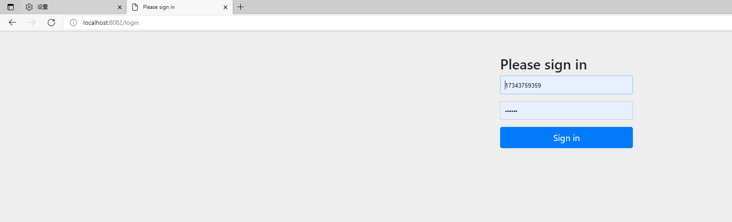
咱们用户名为手机号,输入手机号17343759359,密码132465[后台会MD5加密比对]
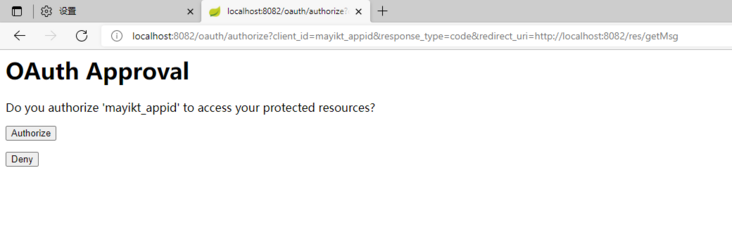
点击授权,获取授权码
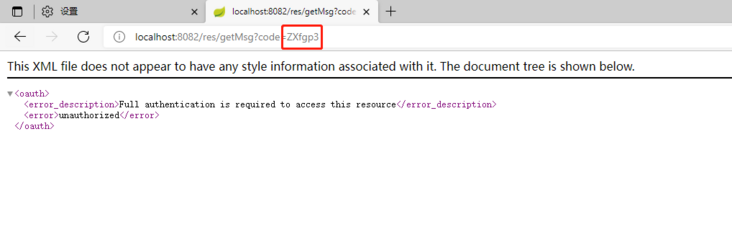
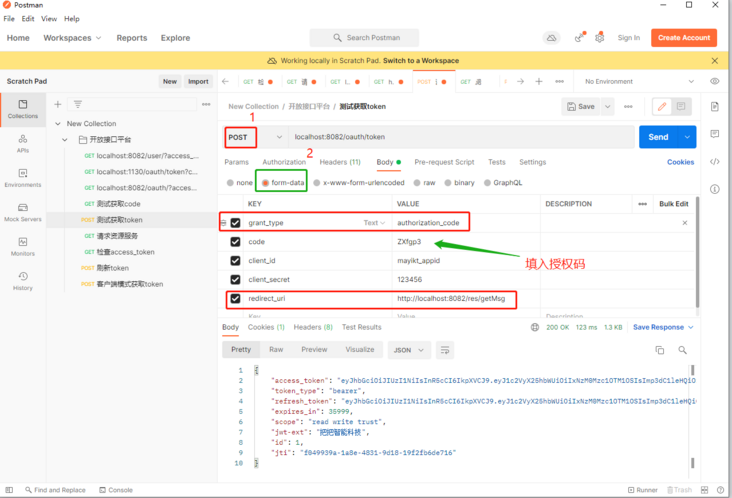
根据授权码获取access_token:
**备注:**有的文章说这里请求头中需带 Authrization:加上工具类GetSecret生成的Basic bWF5aWt0X2FwcGlkOjEyMzQ1Ng==,但是我测试不加也行
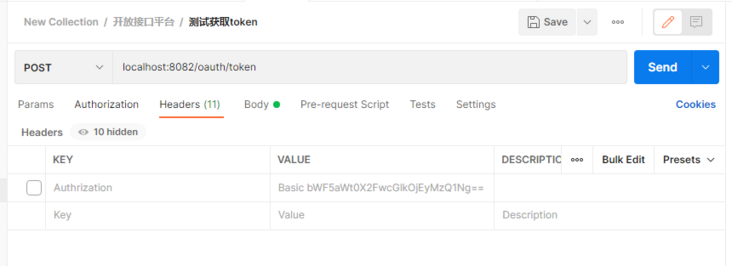
localhost:8082/oauth/token
form-data参数如下
| 参数 | 参数值 |
|---|---|
| grant_type | authorization_code |
| code | ZXfgp3 |
| client_id | mayikt_appid |
| client_secret | 123456 |
| redirect_uri | http://localhost:8082/res/getMsg |
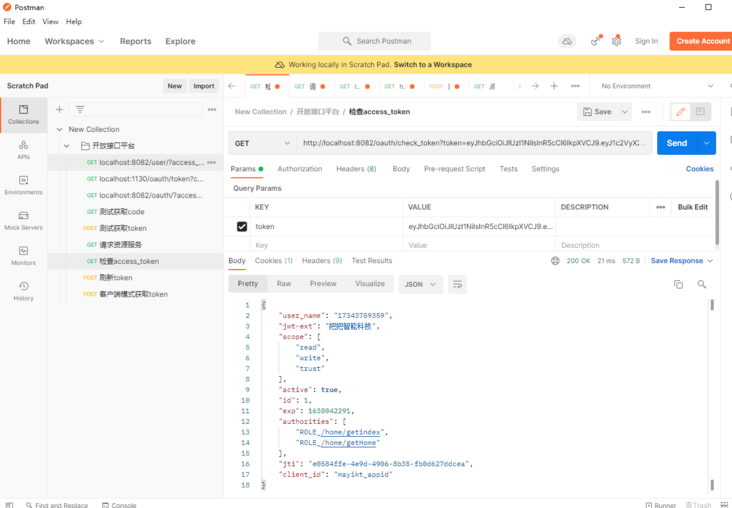
检查access_token:
localhost:8082/oauth/check_token?token=eyJhbGciOiJIUzI1NiIsInR5cCI6IkpXVCJ9.eyJ1c2VyX25hbWUiOiIxNzM0Mzc1OTM1OSIsImp3dC1leHQiOiLmiormiormmbrog73np5HmioAiLCJzY29wZSI6WyJyZWFkIiwid3JpdGUiLCJ0cnVzdCJdLCJpZCI6MSwiZXhwIjoxNjM4MDM4OTYwLCJhdXRob3JpdGllcyI6WyJST0xFXy9ob21lL2dldGluZGV4IiwiUk9MRV8vaG9tZS9nZXRIb21lIl0sImp0aSI6IjRhNDkwMTJiLWUxOGMtNGU4ZC05MjkwLTQ2NzQ5N2JmYmYzMCIsImNsaWVudF9pZCI6Im1heWlrdF9hcHBpZCJ9.WDtqaQ2sGzLIHXFxphOTQm2pYbp1s9H11b2WTao0_Yc
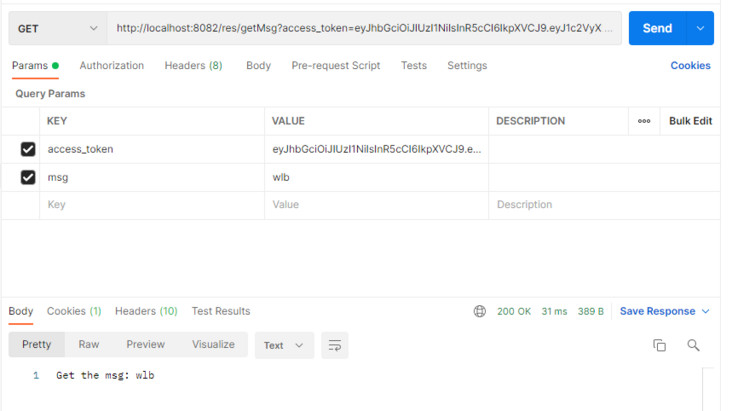
我们访问一下资源服务:
localhost:8082/res/getMsg?access_token=eyJhbGciOiJIUzI1NiIsInR5cCI6IkpXVCJ9.eyJ1c2VyX25hbWUiOiIxNzM0Mzc1OTM1OSIsImp3dC1leHQiOiLmiormiormmbrog73np5HmioAiLCJzY29wZSI6WyJyZWFkIiwid3JpdGUiLCJ0cnVzdCJdLCJpZCI6MSwiZXhwIjoxNjM4MDQyMjkxLCJhdXRob3JpdGllcyI6WyJST0xFXy9ob21lL2dldGluZGV4IiwiUk9MRV8vaG9tZS9nZXRIb21lIl0sImp0aSI6ImUwNTg0ZmZlLTRlOWQtNDkwNi04YjM1LWZiMGQ2MjdkZGNlYSIsImNsaWVudF9pZCI6Im1heWlrdF9hcHBpZCJ9.ko6ybhesegW32pjsWK3Zh1GtSBdeH42624b-1prKCPo&msg=wlb
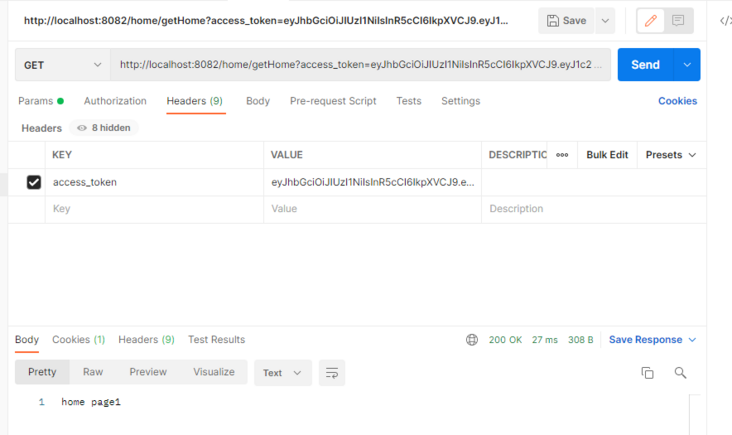
访问我们权限控制的controller
localhost:8082/home/getHome?access_token=eyJhbGciOiJIUzI1NiIsInR5cCI6IkpXVCJ9.eyJ1c2VyX25hbWUiOiIxNzM0Mzc1OTM1OSIsImp3dC1leHQiOiLmiormiormmbrog73np5HmioAiLCJzY29wZSI6WyJyZWFkIiwid3JpdGUiLCJ0cnVzdCJdLCJpZCI6MSwiZXhwIjoxNjM4MDM4OTYwLCJhdXRob3JpdGllcyI6WyJST0xFXy9ob21lL2dldGluZGV4IiwiUk9MRV8vaG9tZS9nZXRIb21lIl0sImp0aSI6IjRhNDkwMTJiLWUxOGMtNGU4ZC05MjkwLTQ2NzQ5N2JmYmYzMCIsImNsaWVudF9pZCI6Im1heWlrdF9hcHBpZCJ9.WDtqaQ2sGzLIHXFxphOTQm2pYbp1s9H11b2WTao0_Yc&msg=wlb
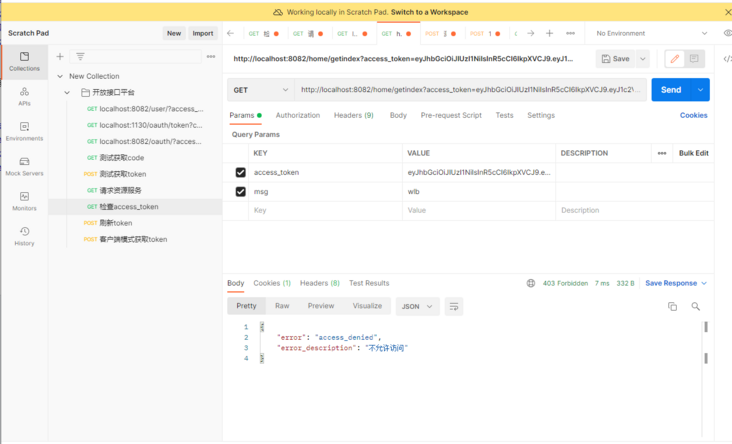
当然我们的17343759359用户我给了所有权限,我登录一个没有getindex权限的用户13549553864时候,请求/home/getindex看一看【已免去前面的授权步骤】
localhost:8082/home/getindex?access_token=eyJhbGciOiJIUzI1NiIsInR5cCI6IkpXVCJ9.eyJ1c2VyX25hbWUiOiIxMzU0OTU1Mzg2NCIsImp3dC1leHQiOiLmiormiormmbrog73np5HmioAiLCJzY29wZSI6WyJyZWFkIiwid3JpdGUiLCJ0cnVzdCJdLCJpZCI6MiwiZXhwIjoxNjM4MDQzNDQyLCJhdXRob3JpdGllcyI6WyJST0xFXy9ob21lL2dldEhvbWUiXSwianRpIjoiODE0MTYyYTMtMzgxNS00YzEzLWIyYjUtM2Q2YjRhODlkMjdmIiwiY2xpZW50X2lkIjoibWF5aWt0X2FwcGlkIn0.QNn8ZvXfahPliP-AaKg_htXexsEWMyBbWNmNT4Ryut4&msg=wlb
访问失败
自此我们完成了jwt方式来实现开放接口平台
今天带大家了解了MySQL、Java、springboot的相关知识,希望对你有所帮助;关于数据库的技术知识我们会一点点深入介绍,欢迎大家关注golang学习网公众号,一起学习编程~
 Ubuntu中安装MySQL
- 上一篇
- Ubuntu中安装MySQL

- 下一篇
- JeecgBoot之我见
-

- 前端进阶之JavaScript设计模式
- 设计模式是开发人员在软件开发过程中面临一般问题时的解决方案,代表了最佳的实践。本课程的主打内容包括JS常见设计模式以及具体应用场景,打造一站式知识长龙服务,适合有JS基础的同学学习。
- 543次学习
-

- GO语言核心编程课程
- 本课程采用真实案例,全面具体可落地,从理论到实践,一步一步将GO核心编程技术、编程思想、底层实现融会贯通,使学习者贴近时代脉搏,做IT互联网时代的弄潮儿。
- 516次学习
-

- 简单聊聊mysql8与网络通信
- 如有问题加微信:Le-studyg;在课程中,我们将首先介绍MySQL8的新特性,包括性能优化、安全增强、新数据类型等,帮助学生快速熟悉MySQL8的最新功能。接着,我们将深入解析MySQL的网络通信机制,包括协议、连接管理、数据传输等,让
- 500次学习
-

- JavaScript正则表达式基础与实战
- 在任何一门编程语言中,正则表达式,都是一项重要的知识,它提供了高效的字符串匹配与捕获机制,可以极大的简化程序设计。
- 487次学习
-

- 从零制作响应式网站—Grid布局
- 本系列教程将展示从零制作一个假想的网络科技公司官网,分为导航,轮播,关于我们,成功案例,服务流程,团队介绍,数据部分,公司动态,底部信息等内容区块。网站整体采用CSSGrid布局,支持响应式,有流畅过渡和展现动画。
- 485次学习
-

- ljg-skills
- ljg-skills 是李继刚开源的 AI 技能与提示词集合,面向大模型使用者整理了一批可复用的 prompt、角色设定和任务技能模板,适合用于学习提示词设计、搭建个人 AI 工作流和沉淀团队常用智能体能力。
- 4478次使用
-

- MELO音乐
- MELO音乐是一站式AI视频与音乐制作助手,对标suno, udio的高品质体验。提供伴奏生成、原创写词、无损导出、哼唱识曲、混音变声等全套音频与短视频编辑工具。无论是流行Kpop、电音说唱、民谣古风、摇滚儿歌还是商用轻音乐,MELO为你免费谱曲,轻松做同款!
- 4124次使用
-

- UniScribe
- UniScribe 是一款 AI 音视频转文字与内容整理工具,支持上传音频、视频文件或粘贴 YouTube 链接,自动生成转写文本、摘要、思维导图和关键问题,并支持多格式导出,适合会议记录、课程学习、访谈整理和内容创作复盘。
- 4108次使用
-

- 剧云
- 剧云是专业中文剧本创作平台,安全稳定运行十余年,集成AI编剧、剧本医生审核、人物小传、剧情关系图、大纲编写、多人协作、Word导入导出、版权管控功能,数据安全防护,轻松高效创作剧本。
- 4296次使用
-

- 万象有声
- 万象有声,一个专为有声创作者打造的新一代智能有声内容创作平台。平台提供专业的智能拆章、智能画本编辑、AI配音、AI生成音效、后期制作、智能对轨、智能审听等有声创作全流程工具,可以帮助创作者高效、低成本创作出引人入胜的有声作品。立即体验,让有声书制作更简单!
- 4269次使用
-
- MySQL 明明加了索引,为什么查询还是很慢?先查这 6 个点
- 2026-06-27 374浏览
-
- golang MySQL实现对数据库表存储获取操作示例
- 2022-12-22 499浏览
-
- golang 基于 mysql 简单实现分布式读写锁
- 2023-01-07 384浏览
-
- 详解如何利用GORM实现MySQL事务
- 2023-01-07 184浏览
-
- Go语言实现操作MySQL的基础知识总结
- 2023-01-23 265浏览


