
探索 Effect-TS 中的选项转换
目前golang学习网上已经有很多关于文章的文章了,自己在初次阅读这些文章中,也见识到了很多学习思路;那么本文《探索 Effect-TS 中的选项转换》,也希望能帮助到大家,如果阅读完后真的对你学习文章有帮助,欢迎动动手指,评论留言并分享~

effect-ts 提供了处理 option 和 either 类型的强大工具。在本文中,我们将探索使用库的实用函数转换和操作这些类型的各种方法。
示例 1:使用 o.getright 将 either 转换为 option
o.getright 函数将 either 转换为 option,并丢弃错误。如果 either 正确,则返回 o.some(value),否则返回 o.none。
import { option as o, either as e, pipe } from 'effect';

function conversions_ex01() {
  const eitherright = e.right('ok'); // create an either containing the value 'ok'
  const eitherleft = e.left('error'); // create an either representing an error

  console.log(o.getright(eitherright)); // output: some('ok')
  console.log(o.getright(eitherleft)); // output: none
}
示例 2:使用 o.getleft 将 either 转换为 option
o.getleft 函数将 either 转换为 option,并丢弃该值。如果 either 为 left,则返回 o.some(error),否则返回 o.none。
import { option as o, either as e, pipe } from 'effect';

function conversions_ex02() {
  const eitherright = e.right('ok'); // create an either containing the value 'ok'
  const eitherleft = e.left('error'); // create an either representing an error

  console.log(o.getleft(eitherright)); // output: none
  console.log(o.getleft(eitherleft)); // output: some('error')
}
示例 3:使用 o.getorelse 获取值或默认值
o.getorelse 函数如果是 some,则返回 option 内的值,否则返回提供的默认值。
import { option as o, pipe } from 'effect';

function conversions_ex03() {
  const some = o.some(1); // create an option containing the value 1
  const none = o.none(); // create an option representing no value

  console.log(
    pipe(
      some,
      o.getorelse(() => 'default')
    )
  ); // output: 1 (since some contains 1)
  console.log(
    pipe(
      none,
      o.getorelse(() => 'default')
    )
  ); // output: 'default' (since none is none)
}
示例 4:使用 o.orelse 链接选项
o.orelse 函数返回提供的 option,如果 self 为 none,否则返回 self。此功能允许选项链接,其中后备是另一个选项。
import { option as o, pipe } from 'effect';

function conversions_ex04() {
  const some1 = o.some(1); // create an option containing the value 1
  const some2 = o.some(2); // create an option containing the value 2
  const none = o.none(); // create an option representing no value

  console.log(
    pipe(
      some1,
      o.orelse(() => some2)
    )
  ); // output: some(1) (since some1 contains 1)
  console.log(
    pipe(
      none,
      o.orelse(() => some2)
    )
  ); // output: some(2) (since none is none and fallback is some2)
}
示例 5:使用 o.orelsesome 回退到默认值
如果 self 为 none,o.orelsesome 函数将返回包含在 some 中的提供的默认值,否则返回 self。此函数允许链接选项,其中回退是包含在 some 中的默认值。
import { option as o, pipe } from 'effect';

function conversions_ex05() {
  const some = o.some(1); // create an option containing the value 1
  const none = o.none(); // create an option representing no value

  console.log(
    pipe(
      some,
      o.orelsesome(() => 2)
    )
  ); // output: some(1) (since some contains 1)
  console.log(
    pipe(
      none,
      o.orelsesome(() => 2)
    )
  ); // output: some(2) (since none is none and fallback is 2)
}
示例 6:使用 o.orelseeither 将选项与 either 上下文链接起来
o.orelseeither 函数返回一个包含 either 的 option,其中 left 来自后备选项,right 来自原始选项。此函数允许链接选项,其中后备提供“任一”以获取更多上下文。
import { option as o, either as e, pipe } from 'effect';

function conversions_ex06() {
  const some1 = o.some(1); // create an option containing the value 1
  const some2 = o.some(2); // create an option containing the value 2
  const none = o.none(); // create an option representing no value

  console.log(
    pipe(
      some1,
      o.orelseeither(() => some2)
    )
  ); // output: some(right(1)) (since some1 contains 1)
  console.log(
    pipe(
      none,
      o.orelseeither(() => some2)
    )
  ); // output: some(left(2)) (since none is none and fallback is some2)
}
示例 7:使用 o.firstsomeof 查找 iterable 中的第一个 some
o.firstsomeof 函数返回在可迭代的 options 中找到的第一个 some。如果全部为none,则返回none。
import { option as o } from 'effect';

function conversions_ex07() {
  const options = [o.none(), o.some(1), o.some(2)]; // create an iterable of options
  const optionsallnone = [o.none(), o.none()]; // create an iterable of none options

  console.log(o.firstsomeof(options)); // output: some(1) (since the first non-none option is some(1))
  console.log(o.firstsomeof(optionsallnone)); // output: none (since all options are none)
}
示例 8:使用 o.torefinement 将返回选项的函数转换为类型保护
o.torefinement 函数将返回 option 的函数转换为类型保护,允许更具体的类型检查。
import { option as o } from 'effect';

function conversions_ex08() {
  const ispositive = (n: number): o.option => n > 0 ? o.some(n) : o.none();
  const ispositiverefinement = o.torefinement(ispositive);

  console.log(ispositiverefinement(1)); // output: true (since 1 is positive)
  console.log(ispositiverefinement(-1)); // output: false (since -1 is not positive)
}
示例 9:使用 o.toarray 将选项转换为数组
o.toarray 函数将 option 转换为数组。如果option为some,则返回包含该值的数组;如果为 none,则返回一个空数组。
import { Option as O } from 'effect';

function conversions_ex09() {
  const some = O.some(1); // Create an Option containing the value 1
  const none = O.none(); // Create an Option representing no value

  console.log(O.toArray(some)); // Output: [1] (since some contains 1)
  console.log(O.toArray(none)); // Output: [] (since none is None)
}
结论
在本文中,我们探索了 effect-ts 提供的用于转换和操作 option 和 either 类型的各种函数。这些函数增强了代码的灵活性和表现力,使您能够更优雅地处理可选值和容易出错的值。无论您需要将 either 转换为 option、链接多个 option 值还是执行类型安全操作,effect-ts 都提供了一组强大的工具来简化这些任务。通过利用这些实用程序,您可以编写更清晰、更易于维护的代码,以有效处理值的存在或不存在。
本篇关于《探索 Effect-TS 中的选项转换》的介绍就到此结束啦,但是学无止境,想要了解学习更多关于文章的相关知识,请关注golang学习网公众号!
 探索 Effect-TS 中的选项 Getter
- 上一篇
- 探索 Effect-TS 中的选项 Getter

- 下一篇
- 美国参议员提跨党派提案:打击有害深度伪造,禁止篡改 AI 生成内容来源信息
-
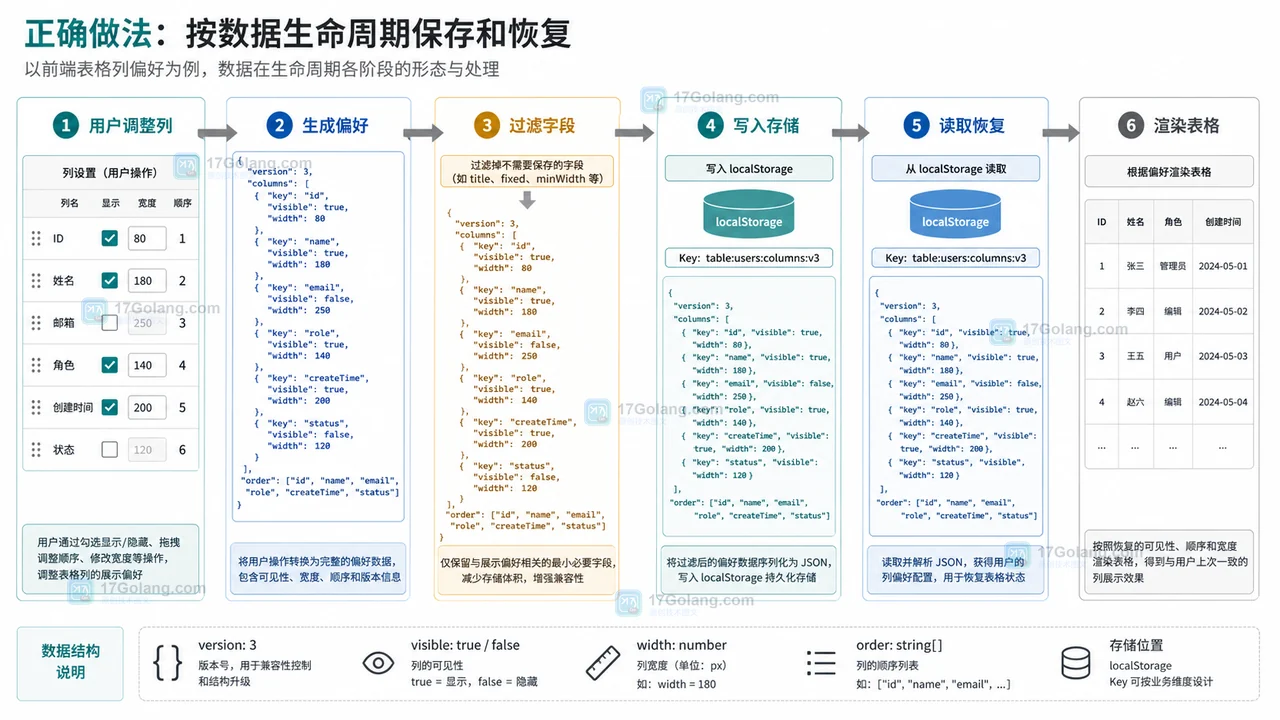
- 文章 · 前端 | 18小时前 | 前端开发 · localStorage · 表格配置 · 用户偏好 · 后台系统 · 用户偏好 localStorage 前端表格 列配置 可见列 列宽保存
- 前端表格列设置刷新后丢失怎么办:可见列、列宽和顺序这样保存
- 351浏览 收藏
-
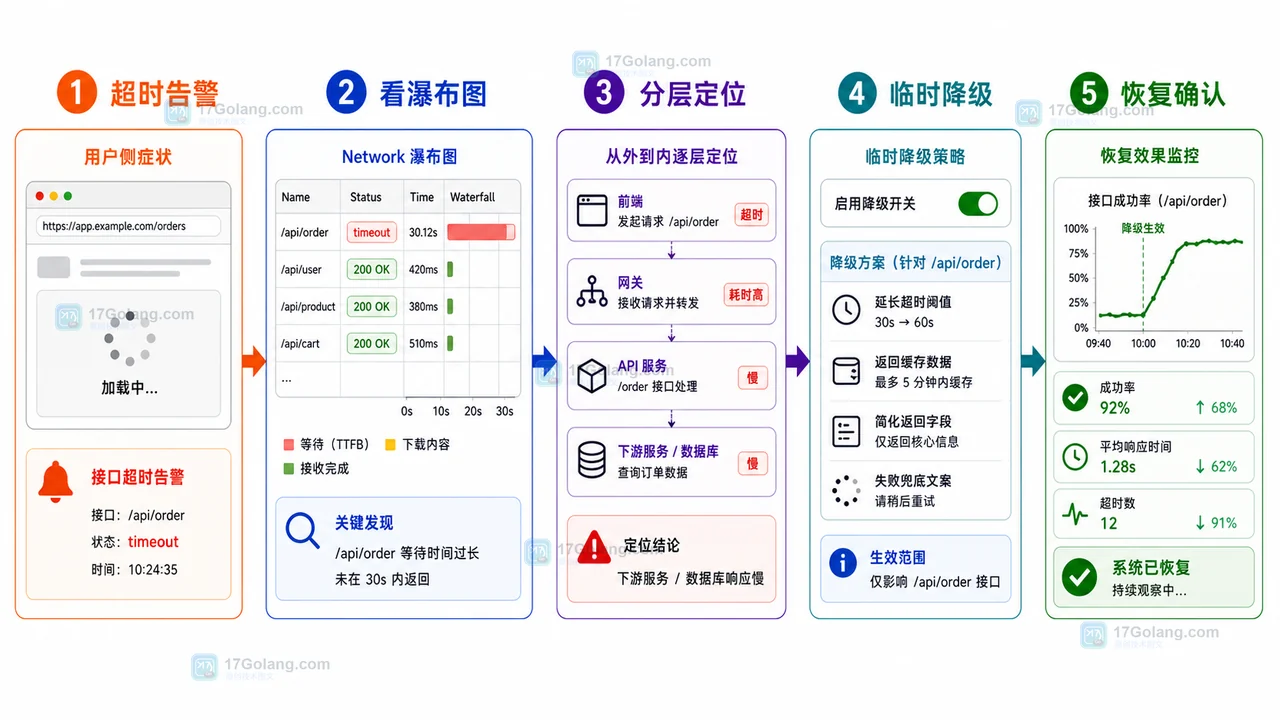
- 文章 · 前端 | 22小时前 | 前端 · 接口排查 · 运维手册 · 性能告警 · 前端 AbortController 接口超时 Network瀑布图 降级回滚 线上告警
- 前端接口超时告警运行手册:从瀑布图到降级回滚
- 287浏览 收藏





-

- 前端进阶之JavaScript设计模式
- 设计模式是开发人员在软件开发过程中面临一般问题时的解决方案,代表了最佳的实践。本课程的主打内容包括JS常见设计模式以及具体应用场景,打造一站式知识长龙服务,适合有JS基础的同学学习。
- 543次学习
-

- GO语言核心编程课程
- 本课程采用真实案例,全面具体可落地,从理论到实践,一步一步将GO核心编程技术、编程思想、底层实现融会贯通,使学习者贴近时代脉搏,做IT互联网时代的弄潮儿。
- 516次学习
-

- 简单聊聊mysql8与网络通信
- 如有问题加微信:Le-studyg;在课程中,我们将首先介绍MySQL8的新特性,包括性能优化、安全增强、新数据类型等,帮助学生快速熟悉MySQL8的最新功能。接着,我们将深入解析MySQL的网络通信机制,包括协议、连接管理、数据传输等,让
- 500次学习
-

- JavaScript正则表达式基础与实战
- 在任何一门编程语言中,正则表达式,都是一项重要的知识,它提供了高效的字符串匹配与捕获机制,可以极大的简化程序设计。
- 487次学习
-

- 从零制作响应式网站—Grid布局
- 本系列教程将展示从零制作一个假想的网络科技公司官网,分为导航,轮播,关于我们,成功案例,服务流程,团队介绍,数据部分,公司动态,底部信息等内容区块。网站整体采用CSSGrid布局,支持响应式,有流畅过渡和展现动画。
- 485次学习
-

- ljg-skills
- ljg-skills 是李继刚开源的 AI 技能与提示词集合,面向大模型使用者整理了一批可复用的 prompt、角色设定和任务技能模板,适合用于学习提示词设计、搭建个人 AI 工作流和沉淀团队常用智能体能力。
- 2909次使用
-

- MELO音乐
- MELO音乐是一站式AI视频与音乐制作助手,对标suno, udio的高品质体验。提供伴奏生成、原创写词、无损导出、哼唱识曲、混音变声等全套音频与短视频编辑工具。无论是流行Kpop、电音说唱、民谣古风、摇滚儿歌还是商用轻音乐,MELO为你免费谱曲,轻松做同款!
- 2694次使用
-

- UniScribe
- UniScribe 是一款 AI 音视频转文字与内容整理工具,支持上传音频、视频文件或粘贴 YouTube 链接,自动生成转写文本、摘要、思维导图和关键问题,并支持多格式导出,适合会议记录、课程学习、访谈整理和内容创作复盘。
- 2627次使用
-

- 剧云
- 剧云是专业中文剧本创作平台,安全稳定运行十余年,集成AI编剧、剧本医生审核、人物小传、剧情关系图、大纲编写、多人协作、Word导入导出、版权管控功能,数据安全防护,轻松高效创作剧本。
- 2862次使用
-

- 万象有声
- 万象有声,一个专为有声创作者打造的新一代智能有声内容创作平台。平台提供专业的智能拆章、智能画本编辑、AI配音、AI生成音效、后期制作、智能对轨、智能审听等有声创作全流程工具,可以帮助创作者高效、低成本创作出引人入胜的有声作品。立即体验,让有声书制作更简单!
- 2802次使用
-
- JavaScript函数定义及示例详解
- 2025-05-11 502浏览
-
- CSS变量简化按钮悬停效果技巧
- 2026-05-31 501浏览
-
- JavaScript符号类型详解与应用
- 2026-05-31 501浏览
-
- HTML剪贴板复制粘贴怎么用
- 2026-05-26 501浏览
-
- data-*属性详解:HTML数据存储与DOM操作技巧
- 2026-05-25 501浏览


