
SpringBoot整合MyBatis实现增删改查案例完整版(附源代码)
来源:SegmentFault
2023-02-24 19:26:11
0浏览
收藏
本篇文章主要是结合我之前面试的各种经历和实战开发中遇到的问题解决经验整理的,希望这篇《SpringBoot整合MyBatis实现增删改查案例完整版(附源代码)》对你有很大帮助!欢迎收藏,分享给更多的需要的朋友学习~
1.Spring Boot是一个简化Spring开发的框架。用来监护spring应用开发,约定大于配置,去繁就简,just run 就能创建一个独立的,产品级的应用。
我们在使用Spring Boot时只需要配置相应的Spring Boot就可以用所有的Spring组件,简单的说,spring boot就是整合了很多优秀的框架,不用我们自己手动的去写一堆xml配置然后进行配置。从本质上来说,Spring Boot就是Spring,它做了那些没有它你也会去做的Spring Bean配置。
闲话少说,上图文:
2.开始
- 新建一个项目

- 选择Spring Initializr项目

- 创建项目的文件结构以及jdk的版本,本次以demo为例

- 选择项目所需要的依赖

- 修改项目名,finish完成,本次选择为修改
来看一眼pom文件
4.0.0 org.springframework.boot spring-boot-starter-parent 2.2.5.RELEASE com.example demo 0.0.1-SNAPSHOT demo Demo project for Spring Boot 1.8 org.springframework.boot spring-boot-starter-jdbc org.springframework.boot spring-boot-starter-web org.mybatis.spring.boot mybatis-spring-boot-starter 2.1.1 mysql mysql-connector-java runtime org.springframework.boot spring-boot-starter-test test org.junit.vintage junit-vintage-engine org.springframework.boot spring-boot-maven-plugin
- 修改配置文件本,文不使用application.properties文件 而使用更加简洁的application.yml文件。
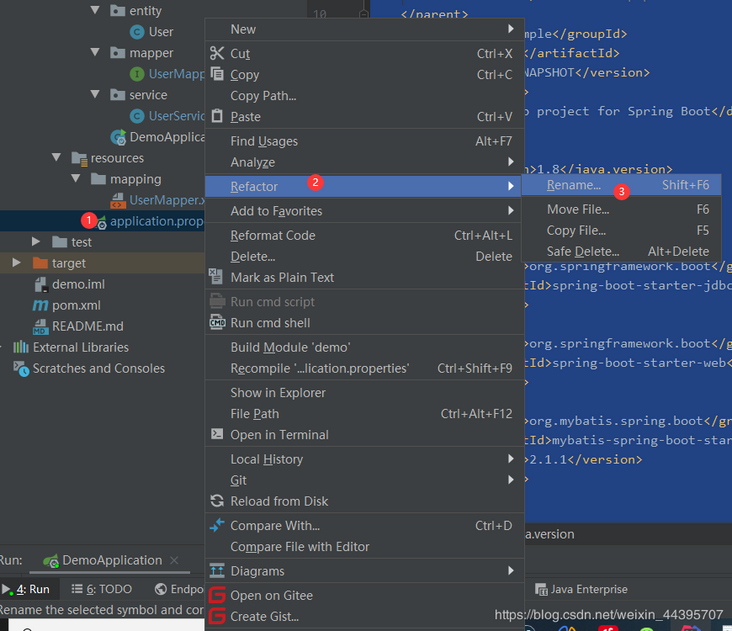
修改为application.yml
内容:
server:
  port: 8080

spring:
  datasource:
    username: root
    password: root
    url: jdbc:mysql://localhost:3306/springboot?useUnicode=true&characterEncoding=utf-8&useSSL=true&serverTimezone=UTC
    driver-class-name: com.mysql.cj.jdbc.Driver

mybatis:
  mapper-locations: classpath:mapping/*Mapper.xml
  type-aliases-package: com.example.entity.demo

logging:
  level:
    com:
      example:
        mapper : debug
创建表:
DROP TABLE IF EXISTS `user`;
CREATE TABLE `user`  (
  `id` int(11) NOT NULL AUTO_INCREMENT,
  `username` varchar(255) CHARACTER SET utf8mb4 COLLATE utf8mb4_general_ci NULL DEFAULT NULL,
  `password` varchar(255) CHARACTER SET utf8mb4 COLLATE utf8mb4_general_ci NULL DEFAULT NULL,
  `address` varchar(255) CHARACTER SET utf8mb4 COLLATE utf8mb4_general_ci NULL DEFAULT NULL,
  PRIMARY KEY (`id`) USING BTREE
) ENGINE = InnoDB AUTO_INCREMENT = 4 CHARACTER SET = utf8mb4 COLLATE = utf8mb4_general_ci ROW_FORMAT = Dynamic;
目录结构:
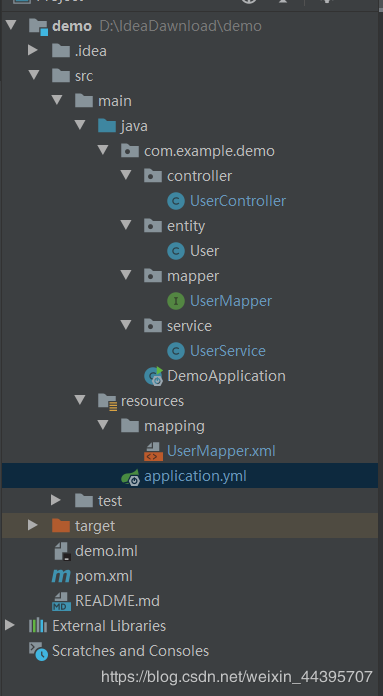
UserController.java
package com.example.demo.controller;

import com.example.demo.entity.User;
import com.example.demo.service.UserService;
import org.springframework.beans.factory.annotation.Autowired;
import org.springframework.boot.autoconfigure.EnableAutoConfiguration;
import org.springframework.web.bind.annotation.*;

/**
 * @author yn2333
 * @Date 2020/03/03
 */

@RestController
@RequestMapping("/test")
public class UserController {

    @Autowired
    private UserService userService;

    @RequestMapping(value = "/selectUserByid", produces = "application/json;charset=UTF-8", method = RequestMethod.GET)
    @ResponseBody
    public String GetUser(User user){
        return userService.Sel(user).toString();
    }

    @RequestMapping(value = "/add", produces = "application/json;charset=UTF-8", method = RequestMethod.GET)
    public String Add(User user){
           return userService.Add(user);
    }

    @RequestMapping(value = "/update", produces = "application/json;charset=UTF-8", method = RequestMethod.GET)
    public String Update(User user){
        return userService.Update(user);
    }

    @RequestMapping(value = "/delete", produces = "application/json;charset=UTF-8", method = RequestMethod.GET)
    public String Delete(User user){
        return userService.Delete(user);
    }
}
User.java
package com.example.demo.entity;

/**
 * @author yn2333
 * @Date 2020/03/03
 */
public class User {
    private Integer id;
    private String username;
    private String password;
    private String address;

    public User(Integer id, String username, String password, String address) {
        this.id = id;
        this.username = username;
        this.password = password;
        this.address = address;
    }

    public Integer getId() {
        return id;
    }

    public String getUsername() {
        return username;
    }

    public String getPassword() {
        return password;
    }

    public String getAddress() {
        return address;
    }

    public void setId(Integer id) {
        this.id = id;
    }

    public void setUsername(String username) {
        this.username = username;
    }

    public void setPassword(String password) {
        this.password = password;
    }

    public void setAddress(String address) {
        this.address = address;
    }

    @Override
    public String toString() {
        return "User{" +
                "id=" + id +
                ", username='" + username + '\'' +
                ", password='" + password + '\'' +
                ", address='" + address + '\'' +
                '}';
    }
}
UserMapper.java
package com.example.demo.mapper;

import com.example.demo.entity.User;
import org.apache.ibatis.annotations.Param;
import org.apache.ibatis.annotations.Select;
import org.springframework.stereotype.Repository;

/**
 * @author yn2333
 * @Date 2020/03/03
 */
@Repository
public interface UserMapper {

    User Sel(@Param("user")User user);

    int Add(@Param("user")User user);

    int Update(@Param("user")User user);

    int Delete(@Param("user")User user);
}
UserService.java
package com.example.demo.service;

import com.example.demo.entity.User;
import com.example.demo.mapper.UserMapper;
import org.springframework.beans.factory.annotation.Autowired;
import org.springframework.stereotype.Service;

/**
 * @author yn2333
 * @Date 2020/03/03
 */
@Service
public class UserService {
    @Autowired
    UserMapper userMapper;

    public User Sel(User user) {
        return userMapper.Sel(user);
    }

    public String Add(User user) {
        int a = userMapper.Add(user);
        if (a == 1) {
            return "添加成功";
        } else {
            return "添加失败";
        }
    }

    public String Update(User user) {
        int a = userMapper.Update(user);
        if (a == 1) {
            return "修改成功";
        } else {
            return "修改失败";
        }
    }

    public String Delete(User user) {
        int a = userMapper.Delete(user);
        if (a == 1) {
            return "删除成功";
        } else {
            return "删除失败";
        }
    }

}
DemoApplication.java
package com.example.demo;

import org.mybatis.spring.annotation.MapperScan;
import org.springframework.boot.SpringApplication;
import org.springframework.boot.autoconfigure.SpringBootApplication;
/**
 * @author yn2333
 * @Date 2020/03/03
 */

@MapperScan("com.example.demo.mapper") //扫描的mapper
@SpringBootApplication
public class DemoApplication {

    public static void main(String[] args) {
        SpringApplication.run(DemoApplication.class, args);
    }

}
UserMapper.xml
INSERT INTO user username, password, address, #{user.username,jdbcType=VARCHAR}, #{user.password,jdbcType=VARCHAR}, #{user.address,jdbcType=VARCHAR}, UPDATE user WHERE id=#{user.id} username = #{user.username}, password = #{user.password}, address = #{user.address}, DELETE FROM user WHERE id = #{user.id}
3.测试
- 启动
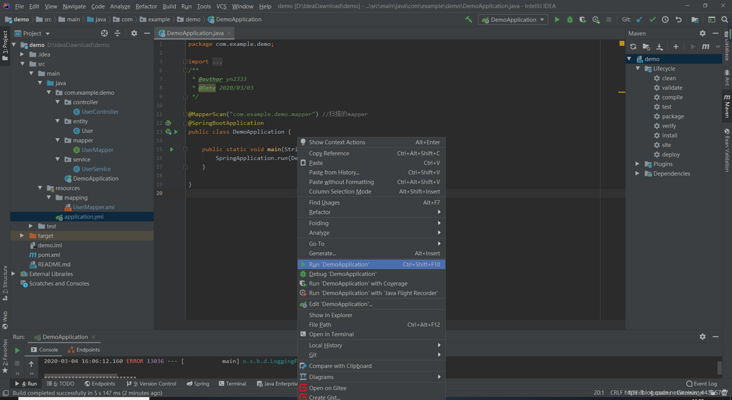
- 添加:
127.0.0.1:8080/test/add?username=无极&password=123456&address=上海市
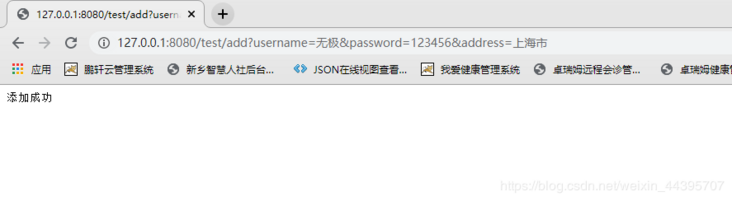
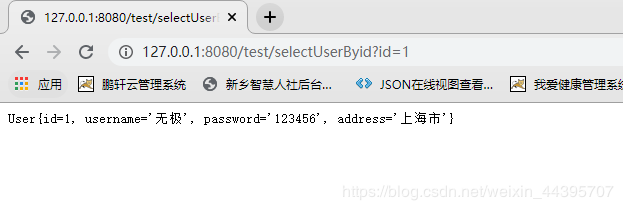
- 查询:
127.0.0.1:8080/test/selectUserByid?id=1
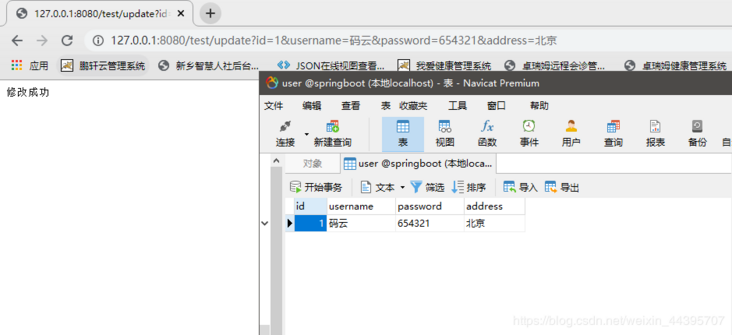
- 修改
127.0.0.1:8080/test/update?id=1&username=码云&password=654321&address=北京
- 删除
127.0.0.1:8080/test/delete?id=1
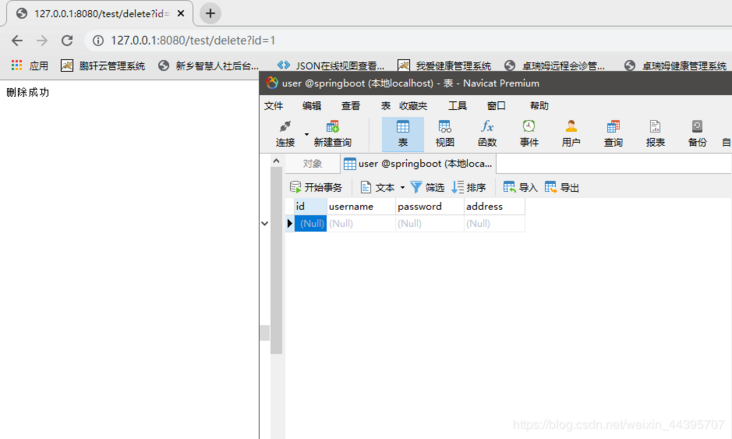
增、删、改、查基本测试已经通过,Navicat刷新 之后就能看到效果。
源代码以及sql文件已打包
下载方式一:https://download.csdn.net/dow...
下载方式二:
扫下方二维码关注公众号回复:code001即可获取

到这里,我们也就讲完了《SpringBoot整合MyBatis实现增删改查案例完整版(附源代码)》的内容了。个人认为,基础知识的学习和巩固,是为了更好的将其运用到项目中,欢迎关注golang学习网公众号,带你了解更多关于mysql的知识点!
版本声明
本文转载于:SegmentFault 如有侵犯,请联系study_golang@163.com删除
 拥有大厂梦,却因为MySQL败下阵来,那你一定要看这本经典之作
- 上一篇
- 拥有大厂梦,却因为MySQL败下阵来,那你一定要看这本经典之作

- 下一篇
- 还在用 Navicat 的,可以试试这几款免费且好用的 MySQL 客户端
查看更多
最新文章
-
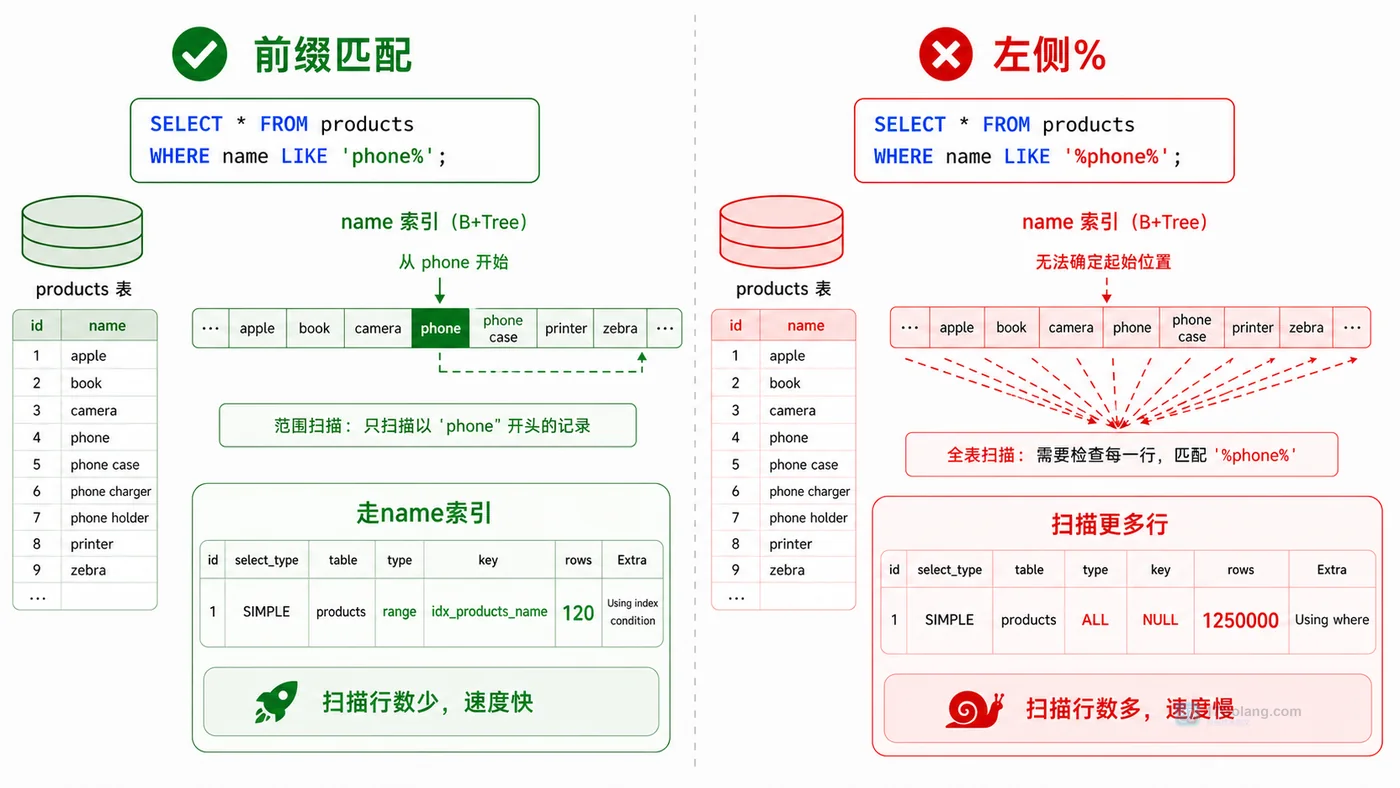
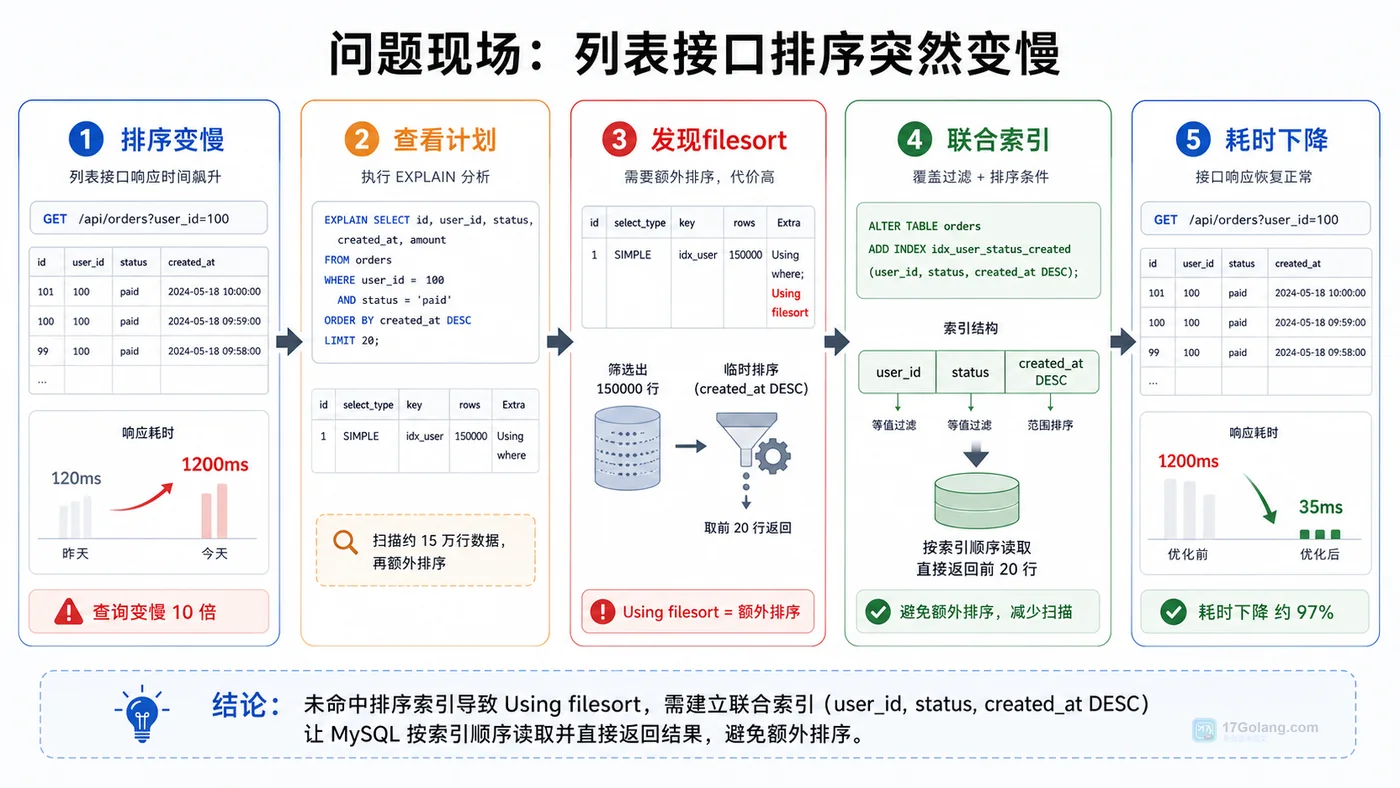
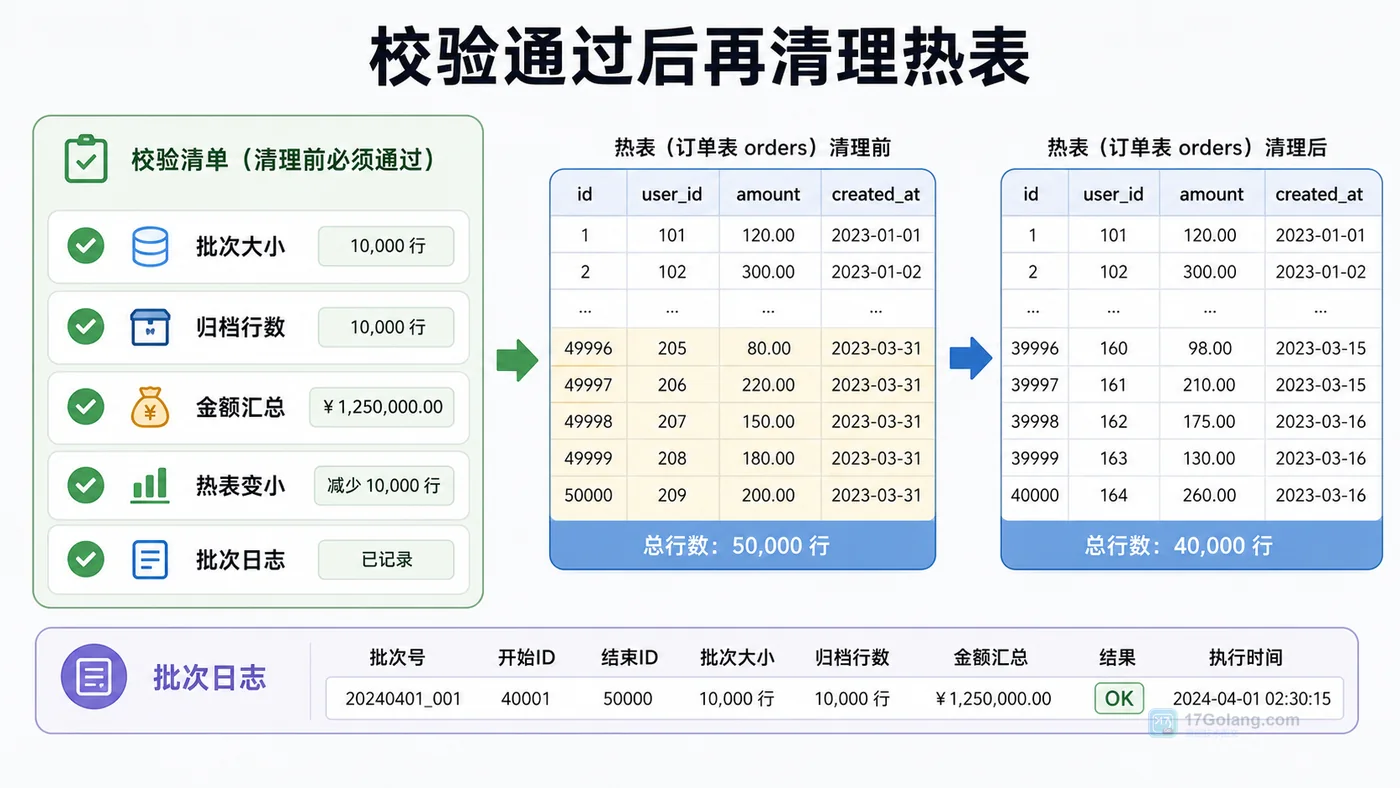
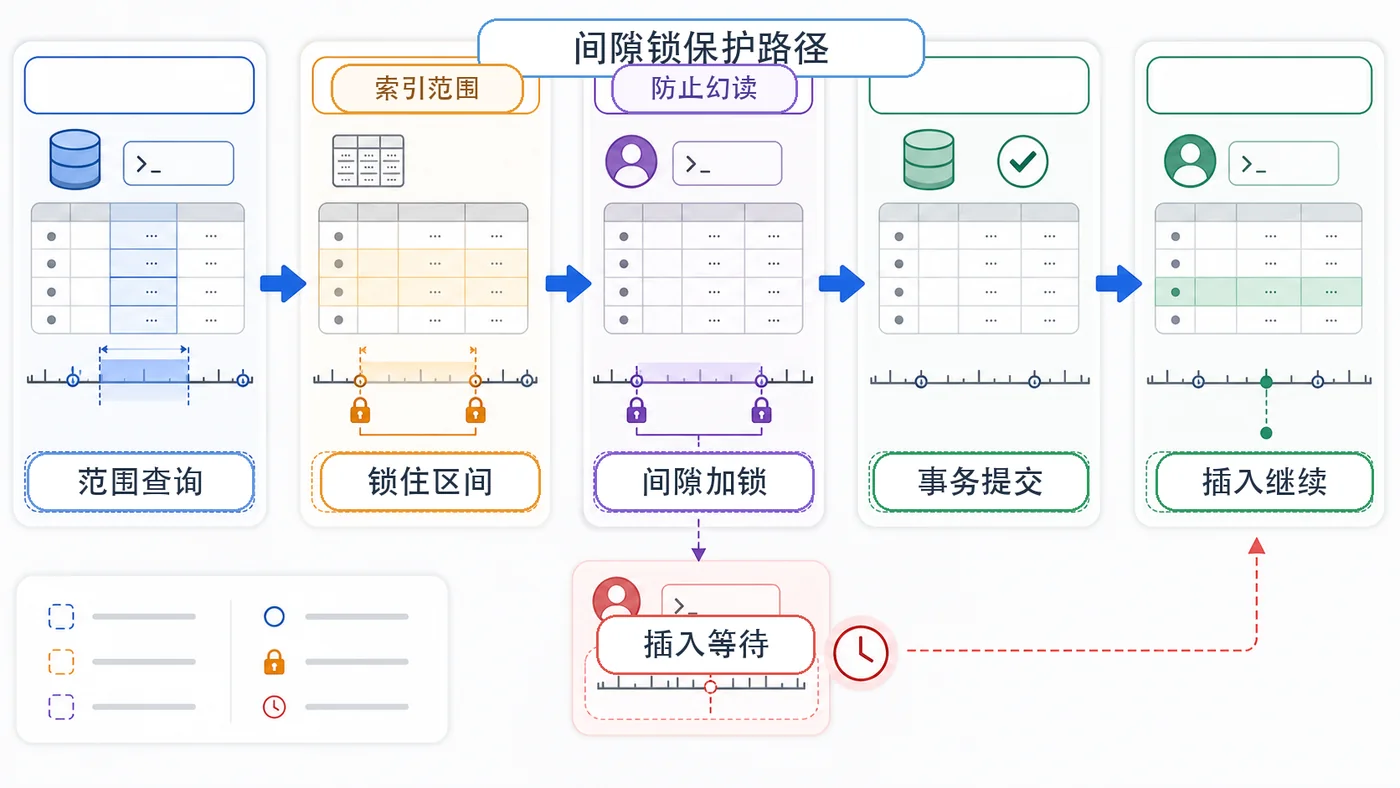
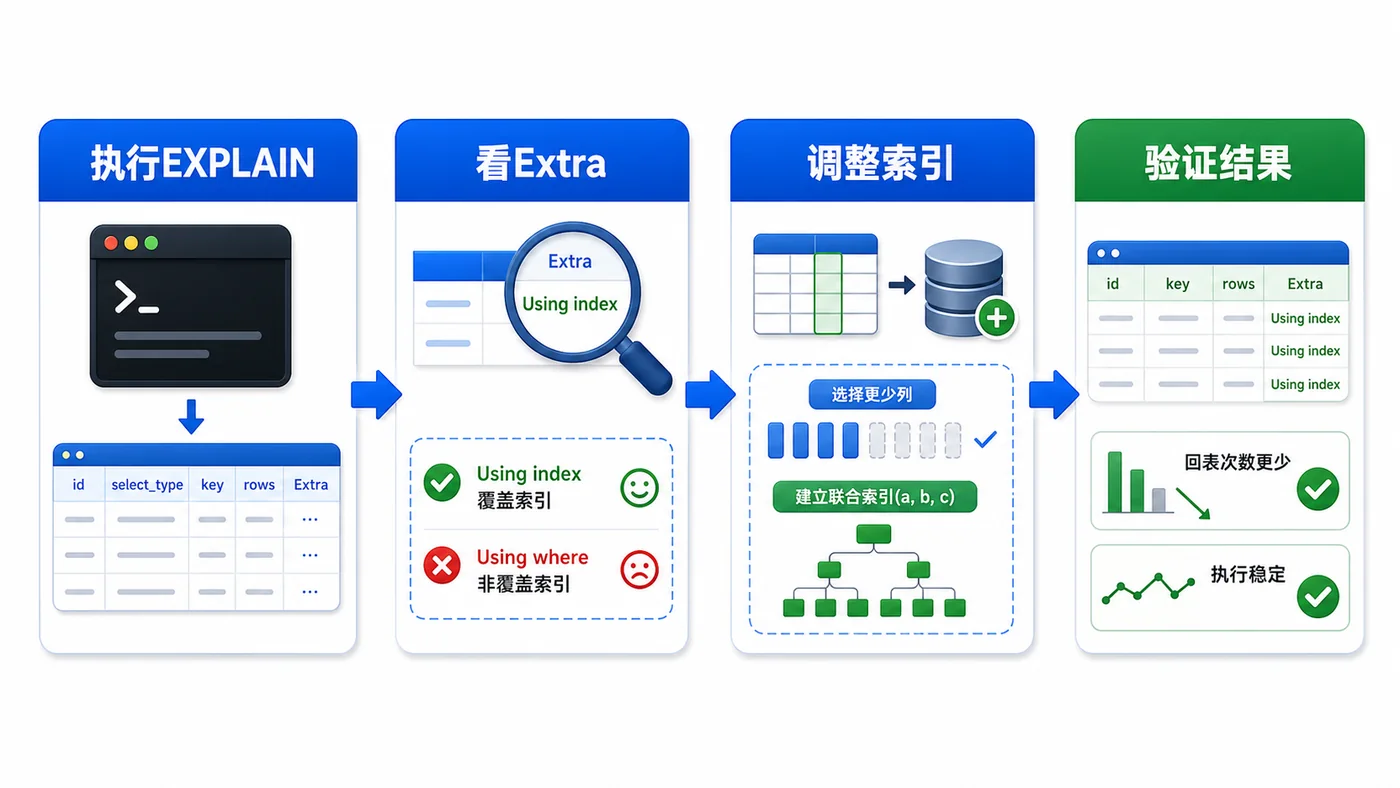
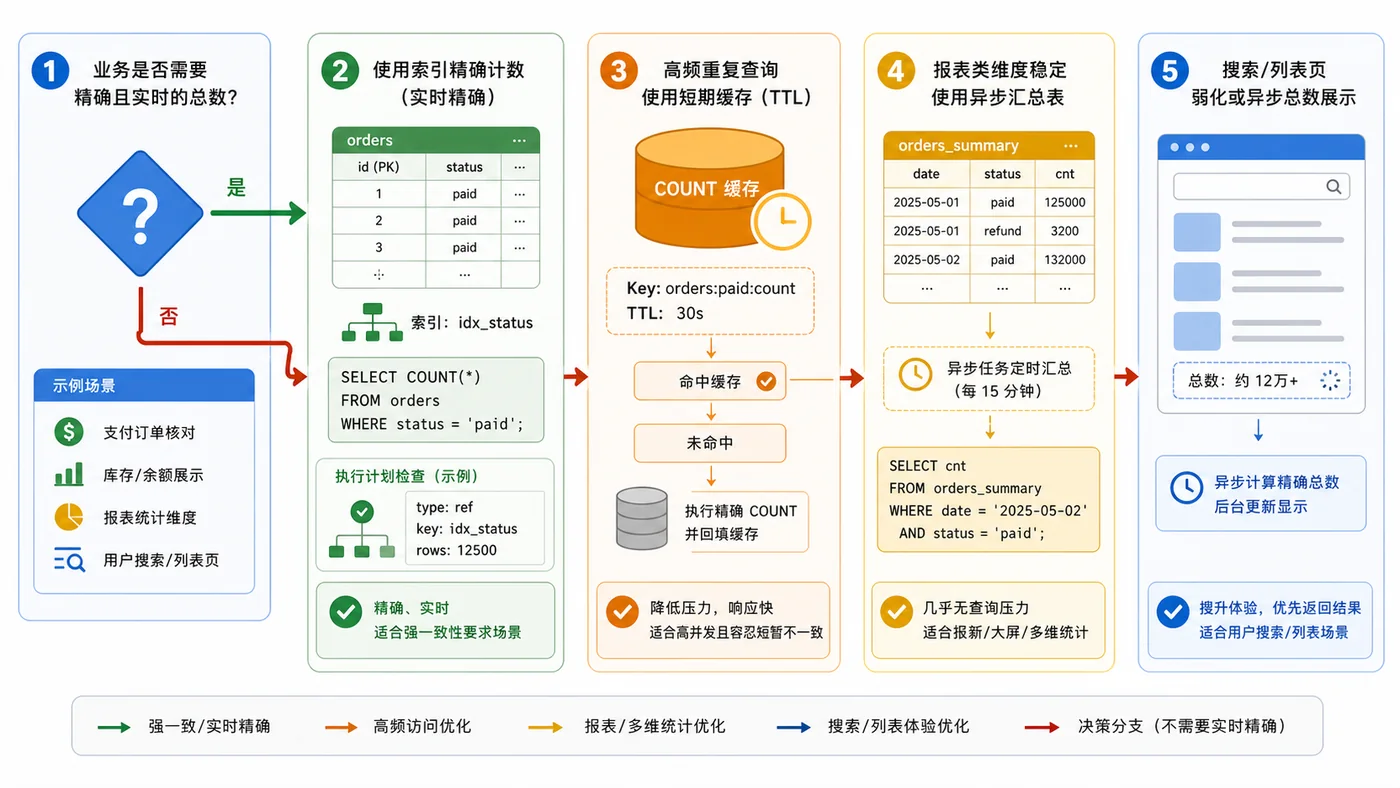
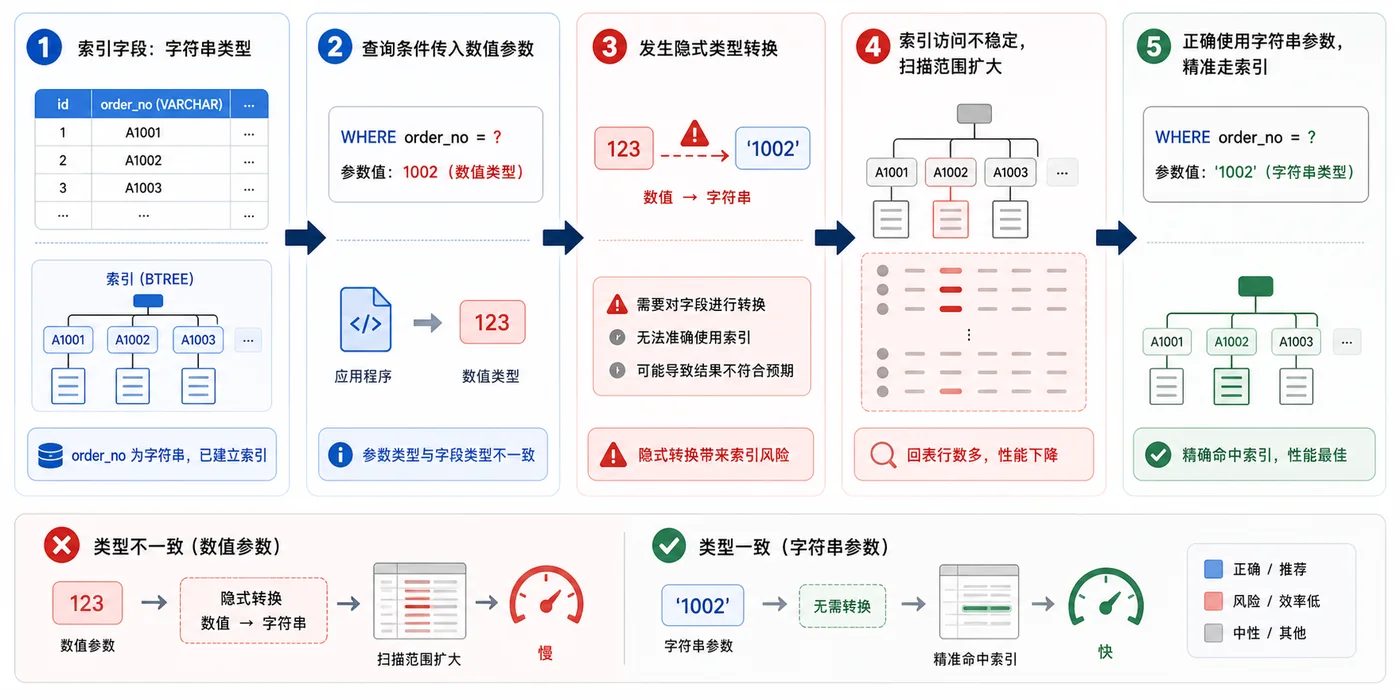
- 数据库 · MySQL | 1星期前 | MySQL · 慢查询 · 索引优化 · COUNT查询 · 汇总表 · 联合索引 覆盖索引 汇总表 MySQL COUNT慢 COUNT(*)优化
- MySQL COUNT(*) 总数查询变慢怎么办:从扫描行数到汇总表的完整治理流程
- 329浏览 收藏
查看更多
课程推荐
-

- 前端进阶之JavaScript设计模式
- 设计模式是开发人员在软件开发过程中面临一般问题时的解决方案,代表了最佳的实践。本课程的主打内容包括JS常见设计模式以及具体应用场景,打造一站式知识长龙服务,适合有JS基础的同学学习。
- 543次学习
-

- GO语言核心编程课程
- 本课程采用真实案例,全面具体可落地,从理论到实践,一步一步将GO核心编程技术、编程思想、底层实现融会贯通,使学习者贴近时代脉搏,做IT互联网时代的弄潮儿。
- 516次学习
-

- 简单聊聊mysql8与网络通信
- 如有问题加微信:Le-studyg;在课程中,我们将首先介绍MySQL8的新特性,包括性能优化、安全增强、新数据类型等,帮助学生快速熟悉MySQL8的最新功能。接着,我们将深入解析MySQL的网络通信机制,包括协议、连接管理、数据传输等,让
- 500次学习
-

- JavaScript正则表达式基础与实战
- 在任何一门编程语言中,正则表达式,都是一项重要的知识,它提供了高效的字符串匹配与捕获机制,可以极大的简化程序设计。
- 487次学习
-

- 从零制作响应式网站—Grid布局
- 本系列教程将展示从零制作一个假想的网络科技公司官网,分为导航,轮播,关于我们,成功案例,服务流程,团队介绍,数据部分,公司动态,底部信息等内容区块。网站整体采用CSSGrid布局,支持响应式,有流畅过渡和展现动画。
- 485次学习
查看更多
AI推荐
-

- ljg-skills
- ljg-skills 是李继刚开源的 AI 技能与提示词集合,面向大模型使用者整理了一批可复用的 prompt、角色设定和任务技能模板,适合用于学习提示词设计、搭建个人 AI 工作流和沉淀团队常用智能体能力。
- 2118次使用
-

- MELO音乐
- MELO音乐是一站式AI视频与音乐制作助手,对标suno, udio的高品质体验。提供伴奏生成、原创写词、无损导出、哼唱识曲、混音变声等全套音频与短视频编辑工具。无论是流行Kpop、电音说唱、民谣古风、摇滚儿歌还是商用轻音乐,MELO为你免费谱曲,轻松做同款!
- 1961次使用
-

- UniScribe
- UniScribe 是一款 AI 音视频转文字与内容整理工具,支持上传音频、视频文件或粘贴 YouTube 链接,自动生成转写文本、摘要、思维导图和关键问题,并支持多格式导出,适合会议记录、课程学习、访谈整理和内容创作复盘。
- 1905次使用
-

- 剧云
- 剧云是专业中文剧本创作平台,安全稳定运行十余年,集成AI编剧、剧本医生审核、人物小传、剧情关系图、大纲编写、多人协作、Word导入导出、版权管控功能,数据安全防护,轻松高效创作剧本。
- 2110次使用
-

- 万象有声
- 万象有声,一个专为有声创作者打造的新一代智能有声内容创作平台。平台提供专业的智能拆章、智能画本编辑、AI配音、AI生成音效、后期制作、智能对轨、智能审听等有声创作全流程工具,可以帮助创作者高效、低成本创作出引人入胜的有声作品。立即体验,让有声书制作更简单!
- 2094次使用
查看更多
相关文章
-
- Linux系统下如何安装Mysql(centOS7以上不支持Mysql)
- 2023-01-16 100浏览
-
- 在windows上用docker desktop安装StoneDB
- 2023-01-20 100浏览
-
- 总结 mysql 一些小技巧
- 2023-01-21 100浏览
-
- MySQL如何给大表加索引
- 2023-01-26 100浏览
-
- 积分商城简要设计
- 2023-02-17 100浏览


