
新特性解读 | MySQL 8.0 错误日志增强特性
编程并不是一个机械性的工作,而是需要有思考,有创新的工作,语法是固定的,但解决问题的思路则是依靠人的思维,这就需要我们坚持学习和更新自己的知识。今天golang学习网就整理分享《新特性解读 | MySQL 8.0 错误日志增强特性》,文章讲解的知识点主要包括MySQL、数据库,如果你对数据库方面的知识点感兴趣,就不要错过golang学习网,在这可以对大家的知识积累有所帮助,助力开发能力的提升。
MySQL 8.0 重新定义了错误日志输出和过滤,改善了原来臃肿并且可读性很差的错误日志。
比如增加了 JSON 输出,在原来的日志后面以序号以及 JSON 后缀的方式展示
比如我机器上的 MySQL 以 JSON 保存的错误日志 mysqld.log.00.json:
[root@centos-ytt80 mysql80]# jq . mysqld.log.00.json
{
  "log_type": 1,
  "prio": 1,
  "err_code": 12592,
  "subsystem": "InnoDB",
  "msg": "Operating system error number 2 in a file operation.",
  "time": "2019-09-03T08:16:12.111808Z",
  "thread": 8,
  "err_symbol": "ER_IB_MSG_767",
  "SQL_state": "HY000",
  "label": "Error"
}
{
  "log_type": 1,
  "prio": 1,
  "err_code": 12593,
  "subsystem": "InnoDB",
  "msg": "The error means the system cannot find the path specified.",
  "time": "2019-09-03T08:16:12.111915Z",
  "thread": 8,
  "err_symbol": "ER_IB_MSG_768",
  "SQL_state": "HY000",
  "label": "Error"
}
{
  "log_type": 1,
  "prio": 1,
  "err_code": 12216,
  "subsystem": "InnoDB",
  "msg": "Cannot open datafile for read-only: './ytt2/a.ibd' OS error: 71",
  "time": "2019-09-03T08:16:12.111933Z",
  "thread": 8,
  "err_symbol": "ER_IB_MSG_391",
  "SQL_state": "HY000",
  "label": "Error"
}
以 JSON 输出错误日志后可读性和可操作性增强了许多。这里可以用 Linux 命令 jq 或者把这个字串 COPY 到其他解析 JSON 的工具方便处理。
只想非常快速的拿出错误信息,忽略其他信息。
[root@centos-ytt80 mysql80]#  jq   '.msg' mysqld.log.00.json
"Operating system error number 2 in a file operation."
"The error means the system cannot find the path specified."
"Cannot open datafile for read-only: './ytt2/a.ibd' OS error: 71"
"Cannot calculate statistics for table `ytt2`.`a` because the .ibd file is missing. Please refer to https://dev.mysql.com/doc/refman/8.0/en/innodb-troubleshooting.html for how to resolve the issue."
"Cannot calculate statistics for table `ytt2`.`a` because the .ibd file is missing. Please refer to https://dev.mysql.com/doc/refman/8.0/en/innodb-troubleshooting.html for how to resolve the issue."
使用 JSON 输出的前提是安装 JSON 输出部件。
INSTALL COMPONENT 'file://component_log_sink_json';

完了在设置变量 SET GLOBAL log_error_services = 'log_filter_internal; log_sink_json';
格式为:过滤规则;日志输出;[过滤规则]日志输出;
查看安装好的部件
mysql> select * from mysql.component;
+--------------+--------------------+---------------------------------------+
| component_id | component_group_id | component_urn                         |
+--------------+--------------------+---------------------------------------+
|            2 |                  1 | file://component_log_sink_json        |
+--------------+--------------------+---------------------------------------+
3 rows in set (0.00 sec)
现在设置 JSON 输出,输出到系统日志的同时输出到 JSON 格式日志。
mysql> SET persist log_error_services = 'log_filter_internal; log_sink_internal; log_sink_json';
Query OK, 0 rows affected (0.00 sec)
来测试一把。我之前已经把表 a 物理文件删掉了。
mysql> select * from a;
ERROR 1812 (HY000): Tablespace is missing for table `ytt2`.`a`.
现在错误日志里有 5 条记录。
[root@centos-ytt80 mysql80]# tailf  mysqld.log

2019-09-03T08:16:12.111808Z 8 [ERROR] [MY-012592] [InnoDB] Operating system error number 2 in a file operation.
2019-09-03T08:16:12.111915Z 8 [ERROR] [MY-012593] [InnoDB] The error means the system cannot find the path specified.
2019-09-03T08:16:12.111933Z 8 [ERROR] [MY-012216] [InnoDB] Cannot open datafile for read-only: './ytt2/a.ibd' OS error: 71
2019-09-03T08:16:12.112227Z 8 [Warning] [MY-012049] [InnoDB] Cannot calculate statistics for table `ytt2`.`a` because the .ibd file is missing. Please refer to https://dev.mysql.com/doc/refman/8.0/en/innodb-troubleshooting.html for how to resolve the issue.
2019-09-03T08:16:14.902617Z 8 [Warning] [MY-012049] [InnoDB] Cannot calculate statistics for table `ytt2`.`a` because the .ibd file is missing. Please refer to https://dev.mysql.com/doc/refman/8.0/en/innodb-troubleshooting.html for how to resolve the issue.
JSON 日志里也有 5 条记录。
[root@centos-ytt80 mysql80]# tailf mysqld.log.00.json

{ "log_type" : 1, "prio" : 1, "err_code" : 12592, "subsystem" : "InnoDB", "msg" : "Operating system error number 2 in a file operation.", "time" : "2019-09-03T08:16:12.111808Z", "thread" : 8, "err_symbol" : "ER_IB_MSG_767", "SQL_state" : "HY000", "label" : "Error" }
{ "log_type" : 1, "prio" : 1, "err_code" : 12593, "subsystem" : "InnoDB", "msg" : "The error means the system cannot find the path specified.", "time" : "2019-09-03T08:16:12.111915Z", "thread" : 8, "err_symbol" : "ER_IB_MSG_768", "SQL_state" : "HY000", "label" : "Error" }
{ "log_type" : 1, "prio" : 1, "err_code" : 12216, "subsystem" : "InnoDB", "msg" : "Cannot open datafile for read-only: './ytt2/a.ibd' OS error: 71", "time" : "2019-09-03T08:16:12.111933Z", "thread" : 8, "err_symbol" : "ER_IB_MSG_391", "SQL_state" : "HY000", "label" : "Error" }
{ "log_type" : 1, "prio" : 2, "err_code" : 12049, "subsystem" : "InnoDB", "msg" : "Cannot calculate statistics for table `ytt2`.`a` because the .ibd file is missing. Please refer to https://dev.mysql.com/doc/refman/8.0/en/innodb-troubleshooting.html for how to resolve the issue.", "time" : "2019-09-03T08:16:12.112227Z", "thread" : 8, "err_symbol" : "ER_IB_MSG_224", "SQL_state" : "HY000", "label" : "Warning" }
{ "log_type" : 1, "prio" : 2, "err_code" : 12049, "subsystem" : "InnoDB", "msg" : "Cannot calculate statistics for table `ytt2`.`a` because the .ibd file is missing. Please refer to https://dev.mysql.com/doc/refman/8.0/en/innodb-troubleshooting.html for how to resolve the issue.", "time" : "2019-09-03T08:16:14.902617Z", "thread" : 8, "err_symbol" : "ER_IB_MSG_224", "SQL_state" : "HY000", "label" : "Warning" }
那可能有人就问了,这有啥意义呢?只是把格式变了,过滤的规则我看还是没变。
那我们现在给第二条日志输出加过滤规则
先把过滤日志的部件安装起来
INSTALL COMPONENT 'file://component_log_filter_dragnet';

mysql> SET persist log_error_services = 'log_filter_internal; log_sink_internal; log_filter_dragnet;log_sink_json';
Query OK, 0 rows affected (0.00 sec)
只保留 error,其余的一律过滤掉。
SET GLOBAL dragnet.log_error_filter_rules = 'IF prio>=WARNING THEN drop.';
检索一张误删的表
mysql> select * from a;
ERROR 1812 (HY000): Tablespace is missing for table `ytt2`.`a`.
查看错误日志和 JSON 错误日志
发现错误日志里有一条 Warning,JSON 错误日志里的被过滤掉了。
2019-09-03T08:22:32.978728Z 8 [Warning] [MY-012049] [InnoDB] Cannot calculate statistics for table `ytt2`.`a` because the .ibd file is missing. Please refer to https://dev.mysql.com/doc/refman/8.0/en/innodb-troubleshooting.html for how to resolve the issue.
再举个例子,每 60 秒只允许记录一个 Warning 事件
mysql> SET GLOBAL dragnet.log_error_filter_rules = 'IF prio==WARNING THEN throttle 1/60.';
Query OK, 0 rows affected (0.00 sec)
多次执行
mysql> select * from b;
ERROR 1812 (HY000): Tablespace is missing for table `ytt2`.`b`.
mysql> select * from b;
ERROR 1812 (HY000): Tablespace is missing for table `ytt2`.`b`.
mysql> select * from b;
ERROR 1812 (HY000): Tablespace is missing for table `ytt2`.`b`.
现在错误日志里有三条 warning 信息
2019-09-03T08:49:06.820635Z 8 [Warning] [MY-012049] [InnoDB] Cannot calculate statistics for table `ytt2`.`b` because the .ibd file is missing. Please refer to https://dev.mysql.com/doc/refman/8.0/en/innodb-troubleshooting.html for how to resolve the issue.

2019-09-03T08:49:31.455907Z 8 [Warning] [MY-012049] [InnoDB] Cannot calculate statistics for table `ytt2`.`b` because the .ibd file is missing. Please refer to https://dev.mysql.com/doc/refman/8.0/en/innodb-troubleshooting.html for how to resolve the issue.
2019-09-03T08:50:00.430867Z 8 [Warning] [MY-012049] [InnoDB] Cannot calculate statistics for table `ytt2`.`b` because the .ibd file is missing. Please refer to https://dev.mysql.com/doc/refman/8.0/en/innodb-troubleshooting.html for how to resolve the issue.
mysqld.log.00.json 只有一条
{ "log_type" : 1, "prio" : 2, "err_code" : 12049, "subsystem" : "InnoDB", "msg" : "Cannot calculate statistics for table `ytt2`.`b` because the .ibd file is missing. Please refer to https://dev.mysql.com/doc/refman/8.0/en/innodb-troubleshooting.html for how to resolve the issue.", "time" : "2019-09-03T08:49:06.820635Z", "thread" : 8, "err_symbol" : "ER_IB_MSG_224", "SQL_state" : "HY000", "and_n_more" : 3, "label" : "Warning" }
总结,我这里简单介绍了下 MySQL 8.0 的错误日志过滤以及 JSON 输出。MySQL 8.0 的 component_log_filter_dragnet 部件过滤规则非常灵活,可以参考手册,根据它提供的语法写出自己的过滤掉的日志输出。
以上就是本文的全部内容了,是否有顺利帮助你解决问题?若是能给你带来学习上的帮助,请大家多多支持golang学习网!更多关于数据库的相关知识,也可关注golang学习网公众号。
 mysql时间筛选
-
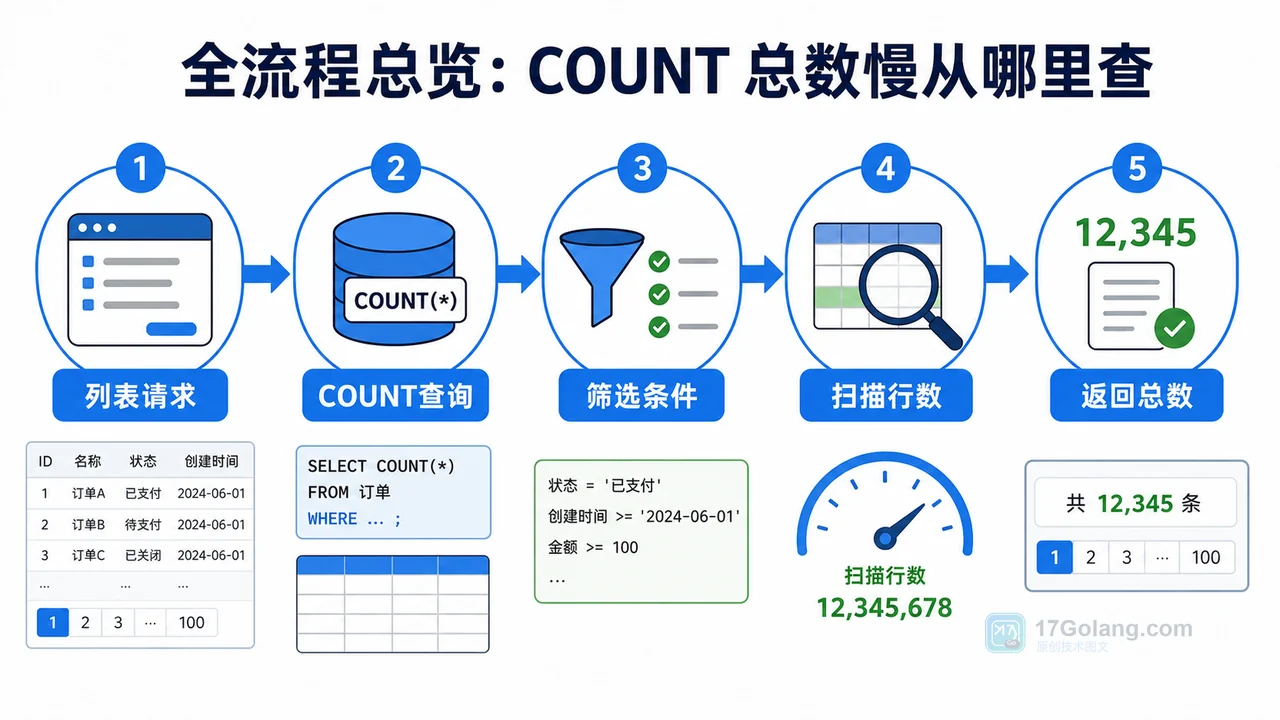
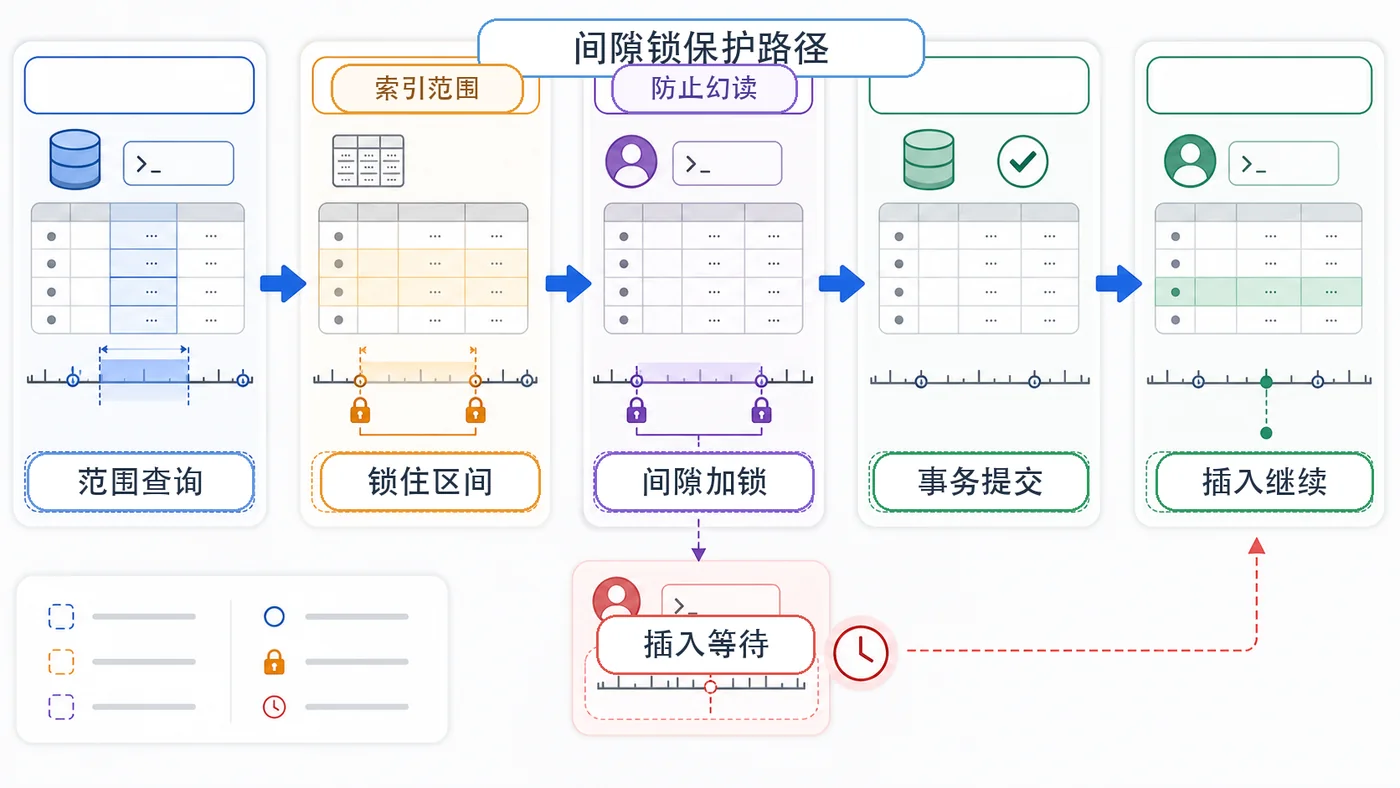
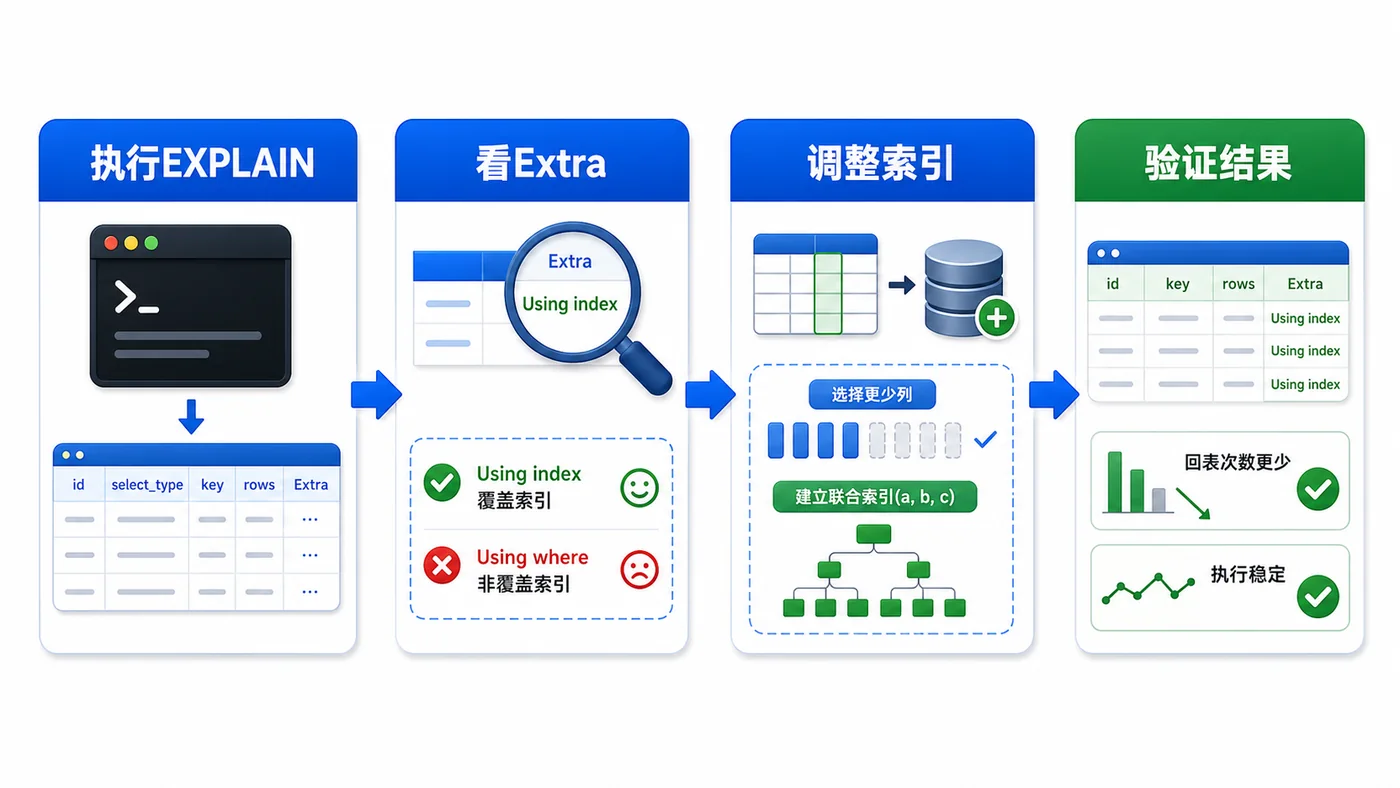
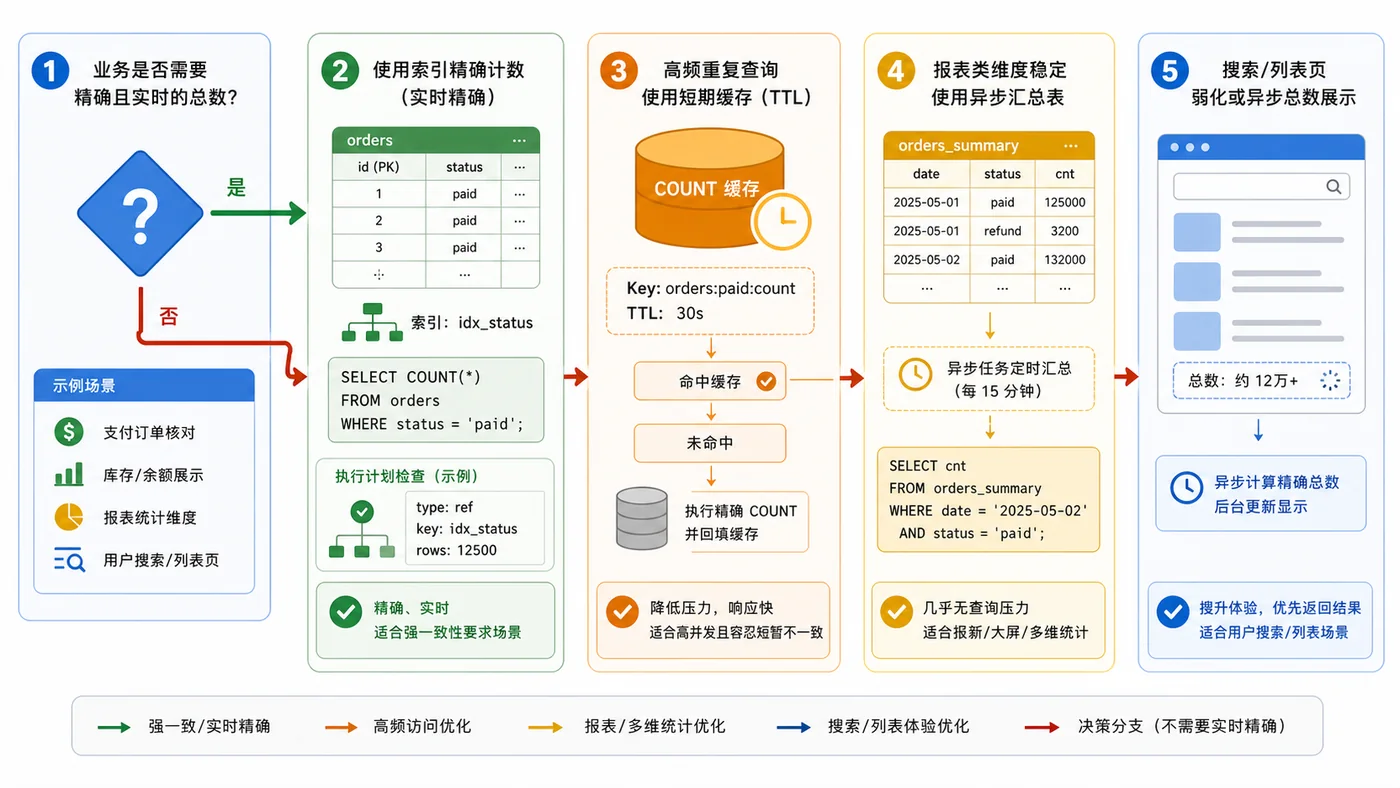
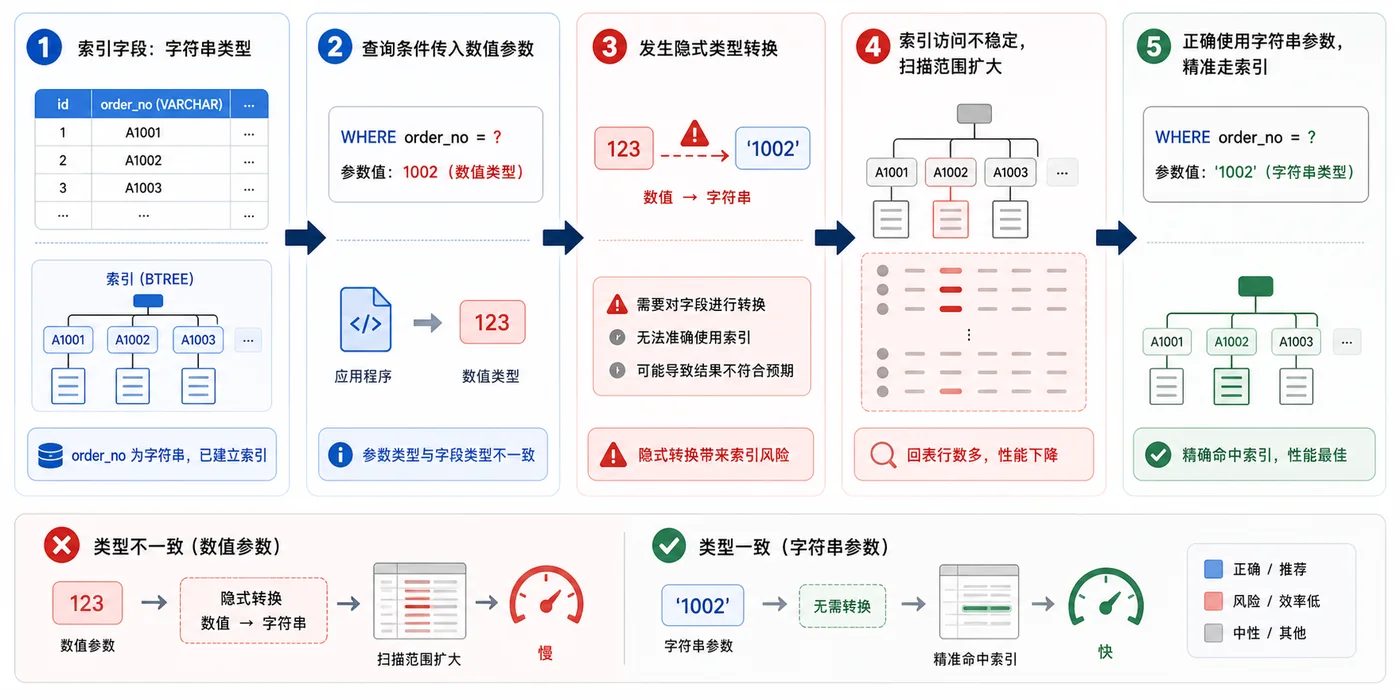
- 数据库 · MySQL | 1星期前 | MySQL · 慢查询 · 索引优化 · COUNT查询 · 汇总表 · 联合索引 覆盖索引 汇总表 MySQL COUNT慢 COUNT(*)优化
- MySQL COUNT(*) 总数查询变慢怎么办:从扫描行数到汇总表的完整治理流程
- 329浏览 收藏
-

- 前端进阶之JavaScript设计模式
- 设计模式是开发人员在软件开发过程中面临一般问题时的解决方案,代表了最佳的实践。本课程的主打内容包括JS常见设计模式以及具体应用场景,打造一站式知识长龙服务,适合有JS基础的同学学习。
- 543次学习
-

- GO语言核心编程课程
- 本课程采用真实案例,全面具体可落地,从理论到实践,一步一步将GO核心编程技术、编程思想、底层实现融会贯通,使学习者贴近时代脉搏,做IT互联网时代的弄潮儿。
- 516次学习
-

- 简单聊聊mysql8与网络通信
- 如有问题加微信:Le-studyg;在课程中,我们将首先介绍MySQL8的新特性,包括性能优化、安全增强、新数据类型等,帮助学生快速熟悉MySQL8的最新功能。接着,我们将深入解析MySQL的网络通信机制,包括协议、连接管理、数据传输等,让
- 500次学习
-

- JavaScript正则表达式基础与实战
- 在任何一门编程语言中,正则表达式,都是一项重要的知识,它提供了高效的字符串匹配与捕获机制,可以极大的简化程序设计。
- 487次学习
-

- 从零制作响应式网站—Grid布局
- 本系列教程将展示从零制作一个假想的网络科技公司官网,分为导航,轮播,关于我们,成功案例,服务流程,团队介绍,数据部分,公司动态,底部信息等内容区块。网站整体采用CSSGrid布局,支持响应式,有流畅过渡和展现动画。
- 485次学习
-

- ljg-skills
- ljg-skills 是李继刚开源的 AI 技能与提示词集合,面向大模型使用者整理了一批可复用的 prompt、角色设定和任务技能模板,适合用于学习提示词设计、搭建个人 AI 工作流和沉淀团队常用智能体能力。
- 2105次使用
-

- MELO音乐
- MELO音乐是一站式AI视频与音乐制作助手,对标suno, udio的高品质体验。提供伴奏生成、原创写词、无损导出、哼唱识曲、混音变声等全套音频与短视频编辑工具。无论是流行Kpop、电音说唱、民谣古风、摇滚儿歌还是商用轻音乐,MELO为你免费谱曲,轻松做同款!
- 1953次使用
-

- UniScribe
- UniScribe 是一款 AI 音视频转文字与内容整理工具,支持上传音频、视频文件或粘贴 YouTube 链接,自动生成转写文本、摘要、思维导图和关键问题,并支持多格式导出,适合会议记录、课程学习、访谈整理和内容创作复盘。
- 1891次使用
-

- 剧云
- 剧云是专业中文剧本创作平台,安全稳定运行十余年,集成AI编剧、剧本医生审核、人物小传、剧情关系图、大纲编写、多人协作、Word导入导出、版权管控功能,数据安全防护,轻松高效创作剧本。
- 2095次使用
-

- 万象有声
- 万象有声,一个专为有声创作者打造的新一代智能有声内容创作平台。平台提供专业的智能拆章、智能画本编辑、AI配音、AI生成音效、后期制作、智能对轨、智能审听等有声创作全流程工具,可以帮助创作者高效、低成本创作出引人入胜的有声作品。立即体验,让有声书制作更简单!
- 2085次使用
-
- Linux系统下如何安装Mysql(centOS7以上不支持Mysql)
- 2023-01-16 100浏览
-
- 在windows上用docker desktop安装StoneDB
- 2023-01-20 100浏览
-
- 总结 mysql 一些小技巧
- 2023-01-21 100浏览
-
- MySQL如何给大表加索引
- 2023-01-26 100浏览
-
- 积分商城简要设计
- 2023-02-17 100浏览


